
Introduction
In the evolving landscape of remote work and digital communication, sales professionals face the persistent challenge of connecting effectively with clients without face-to-face interactions. Traditional phone calls or emails often lack the visual component necessary to convey complex information or demonstrate products efficiently. This gap has prompted the development of specialized tools that facilitate instant screen sharing, interactive presentations, and real-time engagement. Tools like CrankWheel have emerged to address this precise need, streamlining remote sales processes and improving client understanding during virtual interactions.
What Is CrankWheel?
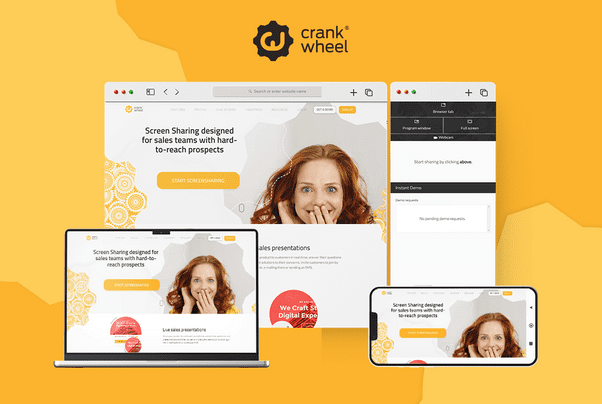
CrankWheel is a cloud-based screen sharing and video sales platform designed for inside sales, telesales, and customer-facing roles. Unlike conventional conferencing software, CrankWheel emphasizes immediacy and ease of use, allowing users to share their screens with prospects without requiring downloads or installations on the client’s end. It operates across devices, including mobile phones, tablets, and desktops, aiming to reduce technical barriers during sales calls. CrankWheel is positioned primarily in the sales enablement category, though its features extend to marketing, customer support, and remote demonstration contexts.
Key Features Explained
CrankWheel’s functionality revolves around several core features that enhance the remote sales experience:
-
Instant Screen Sharing: The platform enables immediate screen sharing with prospects, removing the friction typically associated with traditional software. Users can initiate a session via a link sent through email or text, with visibility on any device.
-
Remote Control: CrankWheel allows either party to interact with forms or applications during a session. This feature facilitates guided walkthroughs, collaborative form completion, and interactive product demonstrations.
-
Sales Video Platform: Users can record screen sessions, webcam videos, or full meetings. These recordings can then be distributed as clickable previews to clients, offering asynchronous engagement opportunities.
-
Engagement Monitoring: CrankWheel tracks viewer interaction with shared content and recorded videos, providing insights into which parts of a presentation received the most attention.
-
Integration and Embedding: The tool can be integrated into existing workflows through embedding in web pages or linking with customer relationship management (CRM) systems, enhancing operational efficiency.
Common Use Cases
CrankWheel serves a variety of applications within remote and digital sales environments:
-
Inside Sales: Reps can visually guide prospects through product features during a phone call, improving comprehension and reducing follow-up sessions.
-
Lead Conversion: Instant access to screen sharing helps convert inbound leads more effectively, allowing for demonstrations during the first interaction.
-
Training and Onboarding: Remote employees can benefit from live demonstrations and collaborative screen sessions for training purposes.
-
Customer Support: Support teams can visually guide clients through troubleshooting processes or software setups.
-
Marketing Demonstrations: Marketing teams can utilize pre-recorded or live demonstrations to showcase product capabilities to larger audiences.
Potential Advantages
Several aspects of CrankWheel contribute to its utility in professional settings:
-
Time Efficiency: By eliminating the need for downloads or complex setup, CrankWheel accelerates the process of initiating demonstrations or presentations.
-
Cross-Device Compatibility: The platform’s support for mobile and desktop devices ensures accessibility for diverse client profiles.
-
Enhanced Engagement: Features like remote control and interactive video content encourage active participation from clients.
-
Data Insights: Monitoring engagement provides teams with actionable analytics to refine messaging and presentation strategies.
Limitations & Considerations
Despite its benefits, CrankWheel has limitations that warrant consideration:
-
Internet Dependence: Performance is reliant on stable internet connectivity, which may affect video quality or real-time responsiveness.
-
Feature Scope: While strong in sales enablement, it lacks extensive project management or collaborative document editing capabilities found in broader conferencing suites.
-
Pricing Constraints: Free-tier limitations may restrict session length or feature access, potentially requiring subscription plans for full functionality.
-
Learning Curve: While intuitive, some users may require time to familiarize themselves with advanced features such as embedding or engagement analytics.
Who Should Consider CrankWheel
CrankWheel is suitable for professionals whose workflows involve:
-
Frequent remote client interactions requiring visual demonstrations.
-
Sales teams aiming to reduce the number of follow-up meetings.
-
Marketing or support staff needing asynchronous or recorded content distribution.
-
Organizations seeking to integrate quick, browser-based screen sharing without requiring client-side downloads.
Who May Want to Avoid It
Conversely, certain scenarios may make CrankWheel less appropriate:
-
Teams needing comprehensive video conferencing solutions with breakout rooms or extensive collaboration features.
-
Organizations operating in areas with unreliable internet infrastructure.
-
Users primarily focused on long-duration webinars rather than short, interactive sales calls.
Comparison With Similar Tools
In comparison to other screen sharing and sales enablement tools, CrankWheel differentiates itself through immediacy and minimal technical requirements. Unlike conventional platforms that require software downloads, CrankWheel emphasizes one-click access. While competitors may offer broader features for full-scale team collaboration, CrankWheel is optimized for speed and simplicity in customer-facing sales scenarios. Its integration of recording, remote control, and engagement analytics creates a focused solution distinct from generalized conferencing applications.
Final Educational Summary
CrankWheel exemplifies the evolution of tools designed to bridge the gap between remote communication and effective sales engagement. By prioritizing immediate access, interactive features, and analytics, it addresses common challenges faced in virtual client interactions. While not a universal solution for all digital collaboration needs, it provides a specialized, research-supported approach to enhancing sales efficacy, customer comprehension, and engagement metrics. Understanding the tool’s strengths and limitations enables organizations to deploy it strategically within relevant workflows.
Disclosure
This article is for educational and informational purposes only. Some links on this website may be affiliate links, but this does not influence our editorial content or evaluations.
