
Introduction
Teams handling outreach campaigns often face challenges like tracking multiple contacts, sending follow-ups on schedule, and coordinating across several accounts. Without structured tools, communication can become disorganized, errors can occur, and performance metrics are difficult to monitor.
Instantly is designed to support team-based email outreach by providing structured automation tools and multi-account management. It helps teams maintain consistency, reduce manual workload, and gain visibility into campaign performance. This article provides a neutral, educational overview of how Instantly works for teams, including its features, applications, advantages, limitations, and considerations.
What Is Instantly?
Instantly is a cloud-based email outreach platform focused on workflow automation and team management. It is classified under cold email and outreach tools. Unlike conventional email clients, it allows teams to organize campaigns into sequences, automate follow-ups, and monitor performance metrics efficiently.
Key aspects include:
- Team Collaboration: Multiple team members can manage campaigns together.
- Multi-Account Management: Distribute sending across several accounts to optimize deliverability.
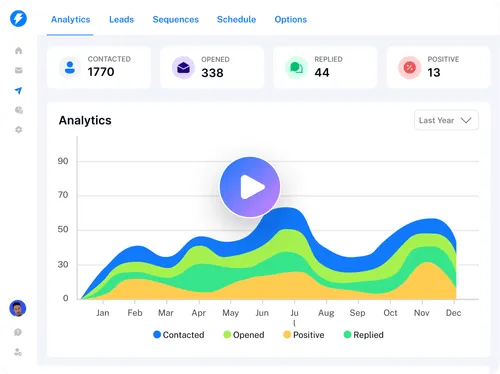
- Analytics Tracking: Provides insights like open rates, replies, and bounces.
Typical users include sales teams, recruitment teams, agencies, and consultants working collaboratively. Instantly does not provide contact lists or guarantee responses, serving purely as an automation and management platform.
Core Features for Teams
Collaborative Campaign Management
Teams can create and manage campaigns collectively. Members can:
- Assign roles and responsibilities
- Monitor ongoing sequences
- Share templates and follow-up strategies
This feature ensures campaigns remain coordinated and reduces miscommunication across team members.
Automated Email Sequences
Workflows are central to Instantly. Users can:
- Set an initial email message
- Schedule automated follow-ups
- Use triggers based on recipient engagement
Automation ensures consistent outreach and frees team members from repetitive manual tasks. Personalized variables like recipient name or company details can be inserted to maintain relevance.
Multi-Account Integration
Teams often require multiple email accounts to:
- Distribute sending load
- Avoid daily sending limits
- Reduce the risk of spam filtering
Managing multiple accounts efficiently ensures campaigns run smoothly at scale. Proper authentication and monitoring are essential for maintaining deliverability.
Follow-Up Automation
Follow-ups are critical for engagement. Teams can:
- Set multiple follow-up steps automatically
- Customize intervals between messages
- Stop sequences when a recipient replies
Automated follow-ups save time but require thoughtful content to avoid appearing generic or repetitive.
Analytics and Monitoring
Instantly provides basic reporting to evaluate team campaigns:
- Open rates
- Reply rates
- Bounce rates
Metrics help teams understand engagement patterns and adjust strategies. These numbers are indicative; privacy settings or client behaviors may affect accuracy.
Practical Team Use Cases
- Sales Teams: Coordinating outreach sequences to prospective clients
- Recruitment Teams: Managing candidate communication efficiently
- Agencies: Handling client campaigns with multiple team members
- Consulting Teams: Scaling client outreach without manual effort
Potential Advantages
- Time Efficiency: Reduces repetitive tasks for teams
- Consistency: Ensures campaigns are organized and structured
- Scalability: Multi-account support allows handling more recipients
- Insightful Metrics: Analytics help guide strategy adjustments
Effectiveness depends on campaign setup, message quality, and data accuracy.
Limitations & Considerations
- Learning Curve: Teams need to understand workflow setup, multi-account rotation, and deliverability principles
- Deliverability Variability: External factors influence inbox placement
- Compliance: Teams must follow GDPR, CAN-SPAM, or local email regulations
- Data Quality: Accurate contact information is essential for effective outreach
Who Should Consider Instantly
- Teams managing structured outreach campaigns
- Agencies coordinating multiple client projects
- Professionals familiar with automation and multi-account management
Who May Want to Avoid It
- Casual users or personal email senders
- Teams or individuals preferring fully manual outreach
- Users unfamiliar with compliance and deliverability concepts
Comparison With Similar Tools
| Feature | Instantly | Reply.io | Mailshake |
|---|---|---|---|
| Team Collaboration | Yes | Limited | Yes |
| Workflow Automation | Yes | Yes | Yes |
| Multi-Account Support | Yes | Limited | Moderate |
| Analytics | Basic | Advanced | Advanced |
| Learning Curve | Moderate | Low | Low |
This table provides a neutral comparison, focusing on features relevant to team use.
Final Educational Summary
Instantly provides teams with a structured approach to email automation, supporting multi-account management, workflow sequences, and basic analytics. Its effectiveness depends on setup, message quality, compliance awareness, and accurate contact lists. Professionals should evaluate its suitability based on team size, campaign needs, and technical capabilities.
Disclosure: This article is for educational and informational purposes only. Some links on this website may be affiliate links, but this does not influence our editorial content or evaluations.
