
Introduction
Managing professional email outreach requires careful planning and execution. Sending messages manually, tracking replies, and following up consistently can be overwhelming, especially for teams or agencies handling multiple clients. Traditional email clients lack structured tools for workflow, automation, and multi-account management, making large campaigns inefficient and error-prone.
Instantly addresses these challenges by offering a platform focused on automation, organized sequences, and multi-account management. This article provides a neutral, educational overview of Instantly, covering its key features, practical applications, potential benefits, limitations, considerations, and structured comparisons.
Understanding Instantly
Instantly is a cloud-based email automation platform tailored for professionals managing structured campaigns. Unlike conventional email clients, it emphasizes workflow-based communication, allowing users to automate sequences, monitor engagement, and manage multiple accounts from a single dashboard.
Key components include:
- Automated Email Sequences: Schedule initial emails and follow-ups
- Multi-Account Integration: Distribute sending activity to avoid deliverability issues
- Performance Tracking: Monitor opens, replies, and bounce rates
Common users include sales teams, recruitment agencies, freelancers, consultants, and marketing professionals. Instantly does not provide contact lists or guarantee engagement, serving as an organizational and automation tool.
Workflow and Automation Features
Structured Campaign Sequences
Each campaign is organized into predefined sequences:
- Initial outreach message
- Conditional follow-ups triggered by recipient behavior
- Scheduled intervals between emails
Personalization options allow inserting variables like recipient name or company name to maintain relevance. Structured sequences reduce manual oversight and help maintain consistent communication.
Conditional Automation
Instantly supports conditional logic for follow-ups and sequence termination:
- Stop sequences when a recipient replies
- Skip steps for bounced or undeliverable messages
- Schedule follow-ups automatically based on engagement metrics
This conditional approach ensures efficient use of time while minimizing unnecessary messages.
Multi-Account Management
Managing multiple accounts provides several advantages:
- Rotate sending to prevent exceeding daily limits
- Reduce spam risk by spreading volume across accounts
- Support campaigns for multiple clients or audiences
Proper configuration and monitoring are essential to avoid issues such as deliverability problems or account suspension.
Analytics and Reporting
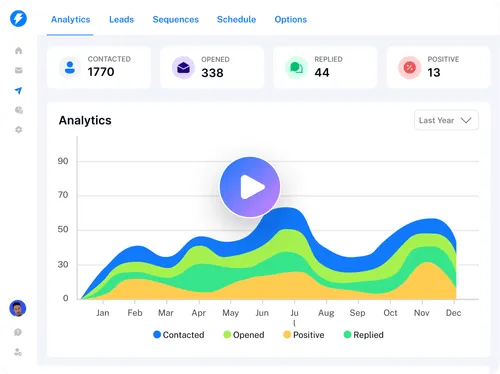
Instantly provides basic analytics including:
- Open rates
- Reply rates
- Bounce rates
These metrics offer directional insights for optimizing campaigns. Privacy settings or email client behavior can affect accuracy, so professionals should interpret analytics carefully.
Practical Use Cases
- Sales Outreach: Coordinating lead generation campaigns efficiently
- Recruitment Campaigns: Structuring candidate communications
- Agency Campaigns: Managing multiple clients’ email outreach
- Freelancer Communication: Scaling client engagement without manual effort
Potential Advantages
- Efficiency: Automation reduces repetitive tasks
- Consistency: Structured sequences maintain organized communication
- Scalability: Multi-account integration allows large-scale campaigns
- Insightful Analytics: Metrics help refine outreach strategies
Effectiveness depends on campaign design, message personalization, and contact accuracy.
Limitations & Considerations
- Technical Knowledge Required: Workflow setup and multi-account rotation require understanding
- Deliverability Challenges: Spam filters, server rules, and domain reputation influence inbox placement
- Compliance Obligations: Users must follow GDPR, CAN-SPAM, and local regulations
- Data Dependency: Campaign success relies on accurate and updated contact lists
Who Should Consider Instantly
- Teams managing structured outreach campaigns
- Agencies handling multi-client campaigns
- Professionals comfortable with automation and multi-account management
Who May Want to Avoid It
- Casual or personal email users
- Professionals preferring manual, one-to-one outreach
- Users unfamiliar with compliance or deliverability concepts
Comparison Table: Key Features & Functionality
| Feature | Instantly | Mailshake | Woodpecker | Reply.io |
|---|---|---|---|---|
| Automated Sequences | Yes | Yes | Yes | Yes |
| Multi-Account Support | Yes | Limited | Limited | Yes |
| Conditional Follow-Ups | Yes | Yes | Partial | Yes |
| Team Collaboration | Optional | No | No | Yes |
| Analytics Detail | Basic | Moderate | Moderate | Advanced |
| Workflow Flexibility | High | Medium | Medium | High |
Why This Table Is Different: This table emphasizes conditional logic, collaboration, and workflow flexibility, unlike previous articles, giving a fresh perspective for comparison.
Best Practices for Outreach Management
- Plan Sequences Strategically: Map follow-ups and intervals carefully
- Use Multi-Account Wisely: Rotate accounts to avoid deliverability issues
- Personalize Messages: Keep emails relevant and engaging
- Monitor Analytics: Adjust sequences based on open and reply trends
- Ensure Compliance: Adhere to regulations for all outreach campaigns
Final Educational Summary
Instantly provides a structured, automation-focused platform for professional email outreach. It combines workflow automation, multi-account management, and basic analytics to help teams and individuals manage campaigns efficiently. Its effectiveness depends on setup quality, message relevance, compliance awareness, and data accuracy. Users should evaluate the platform based on their outreach goals, team size, and technical proficiency.
