Introduction
Modern digital environments generate vast quantities of publicly available information across websites, marketplaces, directories, and social platforms. Organizations, researchers, journalists, and analysts frequently rely on this information to monitor trends, track competitors, study pricing patterns, and collect structured datasets. However, obtaining that information manually can be time-consuming and inconsistent, especially when dealing with large numbers of pages or frequently changing content.
The field of web data extraction, sometimes referred to as web scraping or automated web monitoring, emerged to address this challenge. Tools in this category aim to convert website content into structured datasets that can be analyzed, stored, or integrated into other workflows. Historically, this process required programming knowledge, such as writing scripts in languages like Python or using specialized scraping frameworks.
In recent years, no-code and low-code automation tools have attempted to reduce the technical barrier associated with extracting web data. Platforms now allow users to configure automated “robots” that capture information from websites without building custom software.
One example of this category is Browse AI, a web automation platform designed to collect and monitor information from websites through configurable workflows. Rather than relying entirely on traditional programming methods, it uses a visual interface to guide the data-collection process.
This article examines Browse AI from an educational perspective, focusing on its structure, capabilities, typical applications, and limitations within the broader ecosystem of web data extraction tools.
What Is Browse AI?
Browse AI is a web automation and data extraction platform that allows users to collect structured data from websites and monitor changes in web content over time. The tool operates primarily through browser-based automation, enabling users to define the elements they want to extract from a webpage.
Instead of writing scraping scripts, users typically create automated tasks known as “robots.” These robots replicate actions that a person would normally perform in a browser—such as navigating to a page, selecting specific pieces of information, and recording them into a dataset.
Browse AI generally belongs to the following software categories:
-
No-code web scraping tools
-
Web monitoring platforms
-
Browser automation tools
-
Data extraction services
Its approach centers on visual configuration rather than manual coding. A user can train a robot by demonstrating where the desired information appears on a page. The system then attempts to repeat the process automatically whenever the robot runs.
The resulting data may be exported or integrated into other tools depending on the configuration and platform capabilities. While the core functionality revolves around extracting structured data from websites, the platform also includes scheduling and monitoring features intended to automate repeated data collection tasks.
Key Features Explained
Browse AI combines several technical functions typically associated with web automation platforms. Understanding these features helps clarify how the tool operates and what tasks it is designed to perform.
Visual Data Extraction
One central component of the platform is the ability to select elements directly from a webpage. Users identify items such as product names, prices, text blocks, or images by clicking on them within the interface.
The system then attempts to detect patterns in the page structure so that similar data can be extracted from multiple pages within the same website.
Robot-Based Automation
Automation tasks are organized into programmable units called robots. Each robot contains instructions describing how to navigate a website and which information to capture.
Robots can be configured to:
-
Visit a specific page
-
Extract repeating lists of items
-
Capture detailed data from individual pages
-
Follow navigation links within a website
Once configured, these robots can operate without continuous user input.
Scheduled Data Collection
Another feature involves scheduling. Instead of manually triggering every data collection task, users can define intervals for automated runs.
Examples of scheduling patterns include:
-
Daily monitoring of price changes
-
Weekly data collection from directories
-
Periodic tracking of inventory availability
This allows datasets to remain updated without repeated manual visits to the target website.
Webpage Monitoring
Browse AI also supports monitoring workflows in which robots detect changes in specific elements of a webpage. The system records updates such as modifications to text content, prices, or product listings.
Monitoring can be useful for observing changes over time, especially when tracking dynamic content.
Structured Data Export
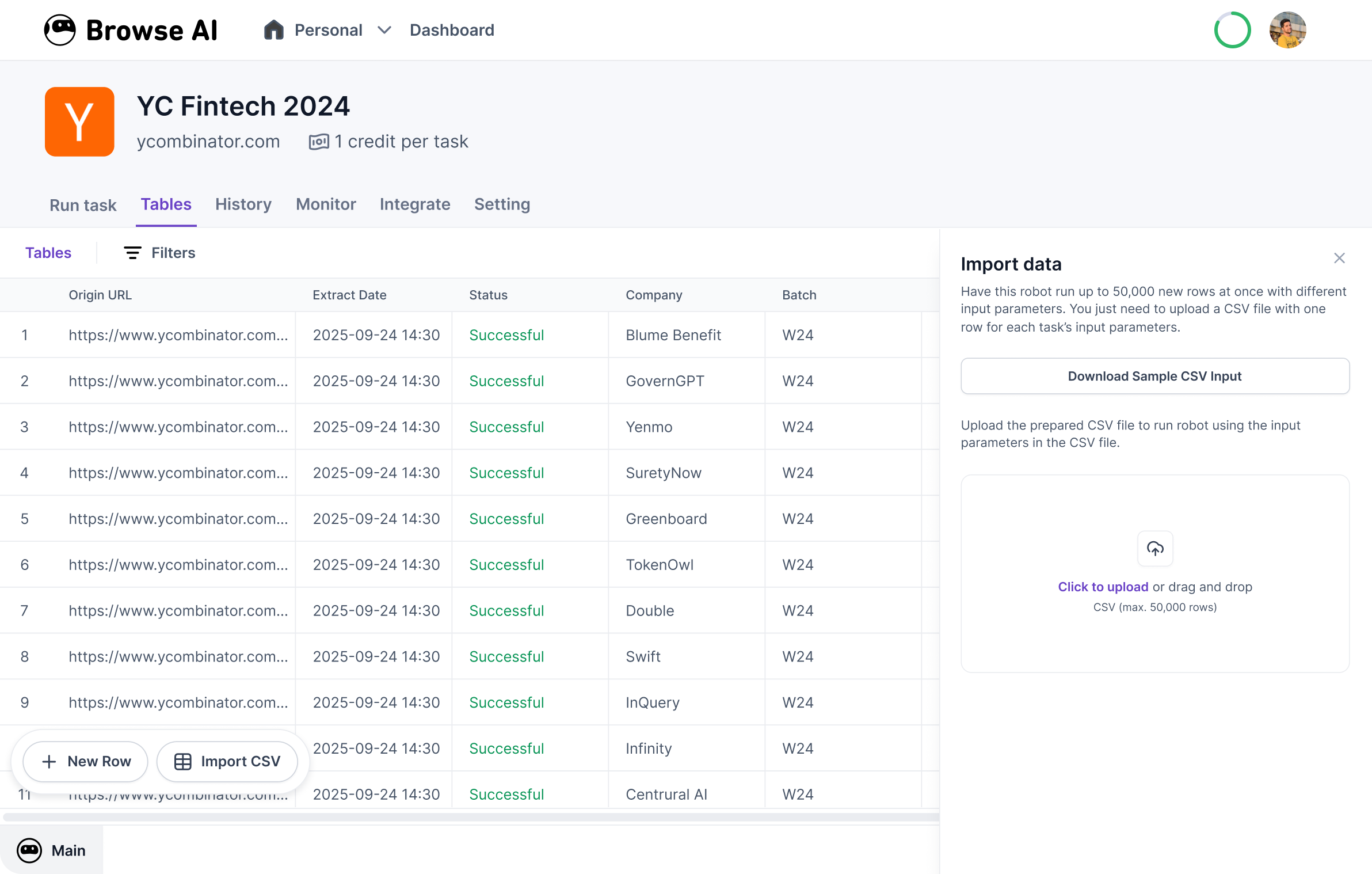
After data is collected, it is typically organized into structured formats such as tables. Structured data makes it easier to analyze information in spreadsheets, databases, or analytics software.
This capability supports workflows that rely on regularly updated datasets.
Workflow Integrations
Some automation tools integrate with other digital services or workflow platforms. These integrations can allow extracted data to trigger additional processes such as notifications or database updates.
The purpose of such integrations is to connect web-extracted information with broader data pipelines.
Common Use Cases
Tools like Browse AI are used in various industries and professional contexts where website information must be gathered repeatedly or monitored over time.
Market Research
Researchers and analysts often study pricing trends, product listings, or service offerings across online marketplaces. Automated extraction tools can collect this information systematically.
Instead of manually recording data from each page, a configured robot gathers the information automatically.
Competitive Analysis
Businesses sometimes track how competitors present products, promotions, or pricing structures online. Monitoring tools can capture updates when those details change.
Automated extraction allows analysts to observe patterns across many pages without visiting them individually.
Academic Research
Researchers studying digital markets, media trends, or online content ecosystems sometimes rely on web datasets. Data extraction tools can help compile structured collections of information from publicly accessible sources.
Content Aggregation
Certain workflows involve collecting information from multiple websites into a single dataset. For example, listings, announcements, or product catalogs may be gathered from several sources.
Automated extraction can help standardize this process.
Directory Data Collection
Public directories often contain information about businesses, services, or organizations. Automation tools can extract entries from these directories and compile them into structured datasets for analysis.
Website Change Tracking
Some users monitor specific webpages for updates, such as newly added listings or changes to product availability. Automation tools can check these pages periodically and record differences.
Potential Advantages
Platforms designed for no-code web automation attempt to address several challenges associated with traditional web scraping.
Reduced Technical Barriers
Historically, extracting web data required knowledge of programming languages and scraping frameworks. Tools that rely on visual interfaces attempt to make data extraction accessible to users without coding experience.
By allowing element selection directly within a webpage, these platforms simplify the initial setup process.
Automation of Repetitive Tasks
Data collection tasks can become repetitive when performed manually. Automation reduces the need to revisit websites repeatedly for the same information.
Scheduling features enable ongoing monitoring without continuous manual oversight.
Structured Data Organization
When data is captured automatically, it can be formatted into tables or structured datasets. This helps maintain consistency across data entries, especially when dealing with large volumes of information.
Structured datasets are easier to analyze with spreadsheet tools or statistical software.
Scalability for Large Data Sets
Automation tools can process multiple pages or websites more efficiently than manual browsing. This makes them useful when collecting large datasets that would otherwise require extensive human effort.
Monitoring Over Time
Tracking changes in web content is difficult without automated systems. Monitoring features allow users to observe how certain variables evolve, such as pricing trends or product availability.
Limitations & Considerations
Despite the convenience offered by automation platforms, several limitations should be considered when evaluating tools in this category.
Dependence on Website Structure
Web extraction tools rely heavily on the structure of a webpage. If a website changes its layout or underlying HTML structure, the extraction process may stop working correctly.
Robots may need to be retrained or reconfigured when such changes occur.
Data Accuracy Challenges
Automated extraction may occasionally capture incorrect data if elements are misidentified or if page structures vary unexpectedly. Verification and data cleaning are often necessary before analysis.
Ethical and Legal Context
Collecting data from websites raises questions about terms of service, usage rights, and ethical considerations. Some websites restrict automated access or data extraction through their policies.
Users must evaluate the legal and ethical context of the websites they interact with.
Dynamic or Complex Websites
Websites that rely heavily on interactive elements, authentication, or dynamic content may present challenges for automated tools. In such cases, extraction workflows may become more complex.
Learning Curve
Although no-code tools aim to simplify automation, users still need to understand how web pages are structured and how to configure extraction rules effectively.
Who Should Consider Browse AI
Browse AI and similar platforms may be relevant for individuals or organizations that require recurring access to structured information from publicly available websites.
Potential users may include:
-
Market researchers analyzing pricing or listings
-
Data analysts gathering web-based datasets
-
Academic researchers studying online trends
-
Journalists investigating digital marketplaces
-
Businesses monitoring publicly available competitor information
These users typically benefit from automation when collecting information from multiple pages or when updates occur frequently.
Who May Want to Avoid It
Not every data-related workflow requires automated web extraction. Certain users may find other solutions more appropriate.
Examples include:
-
Developers who prefer building custom scraping frameworks with full control over the code
-
Individuals collecting small amounts of data that can be gathered manually
-
Organizations requiring guaranteed long-term stability in data pipelines
-
Workflows involving highly protected or restricted website environments
In some cases, API-based data access or official data feeds may provide more reliable sources of information than scraping tools.
Comparison With Similar Tools
Browse AI exists within a growing ecosystem of web automation and data extraction platforms. While tools differ in design and technical capabilities, they often share similar goals.
No-Code Web Scraping Platforms
Several platforms emphasize visual configuration rather than coding. These systems allow users to select elements directly on webpages and train automated extraction tasks.
Browse AI belongs to this category, which aims to reduce the need for technical scripting knowledge.
Browser Automation Tools
Another related category focuses on automating browser actions rather than solely extracting data. These tools replicate user behavior such as clicking, typing, and navigating across pages.
Browse AI includes elements of browser automation through its robot training system.
Developer-Focused Scraping Frameworks
Traditional scraping frameworks provide more customization but require programming expertise. Developers can build highly tailored extraction pipelines, although setup and maintenance often demand technical skills.
In contrast, no-code tools prioritize accessibility and ease of configuration.
Monitoring Platforms
Some tools specialize in tracking changes to webpages rather than extracting large datasets. Monitoring features detect updates in page content and notify users when modifications occur.
Browse AI integrates monitoring functionality alongside its data extraction capabilities.
Final Educational Summary
Browse AI represents a contemporary approach to web data extraction that emphasizes visual configuration and automated workflows. By allowing users to train robots that capture information directly from webpages, the platform attempts to simplify tasks traditionally handled through programming scripts.
Within the broader landscape of data automation tools, it functions as a hybrid system combining web scraping, monitoring, and browser automation capabilities. Its features focus on structured data extraction, scheduled data collection, and the monitoring of webpage changes.
Like many automation platforms, its effectiveness depends on factors such as website structure, data accuracy requirements, and the stability of target pages. While no-code interfaces reduce technical barriers, users still need to understand how web pages are organized and how automation interacts with them.
In research, analytics, and digital monitoring contexts, tools like Browse AI illustrate how web automation technology is evolving to support large-scale data collection without requiring extensive programming expertise.