Introduction
Managing construction projects involves coordinating multiple moving parts—labor, materials, schedules, budgets, compliance requirements, and client expectations. As projects scale in size or complexity, traditional methods such as spreadsheets, paper logs, and disconnected communication channels often become inefficient. Delays, cost overruns, and miscommunication can emerge when data is fragmented or outdated.
To address these challenges, construction management software platforms have developed as centralized systems that organize workflows, track project progress, and document operational activities. These tools aim to provide visibility into project performance while reducing administrative friction. Within this category, platforms vary widely in scope, complexity, and pricing models, catering to different segments of the construction industry.
Contractor Foreman is one such tool designed to assist contractors, project managers, and construction teams in handling administrative and operational tasks. Understanding how it fits into the broader ecosystem of construction software requires examining its functionality, intended use, and limitations.
What Is Contractor Foreman?
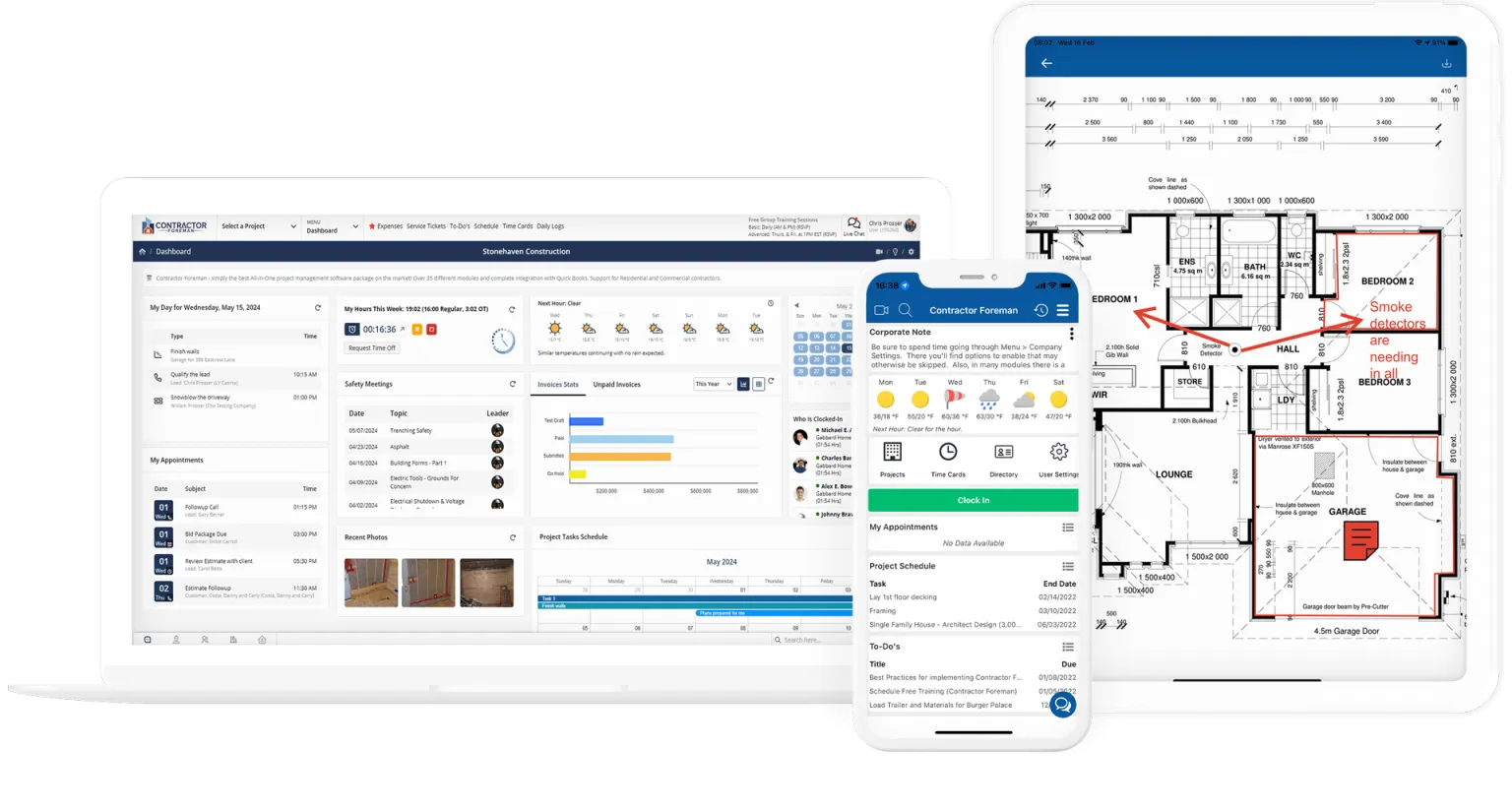
Contractor Foreman is a cloud-based construction management software platform intended primarily for small to mid-sized construction businesses. It falls within the broader category of project management and field service software, with a focus on construction workflows.
The platform integrates various operational components such as estimating, scheduling, document management, and financial tracking into a unified interface. Rather than functioning as a single-purpose application, Contractor Foreman operates as a multi-module system designed to reduce reliance on separate tools.
Unlike enterprise-level construction platforms that often require extensive onboarding and customization, Contractor Foreman is generally positioned as a more accessible solution for teams that need structured processes without large-scale implementation overhead.
Key Features Explained
Project Management and Scheduling
A central component of Contractor Foreman is its project management functionality. Users can create project timelines, assign tasks, and monitor progress across different phases. Scheduling tools allow teams to define milestones and dependencies, helping to coordinate subcontractors and internal staff.
The system also includes calendar-based views, which can assist in visualizing overlapping tasks and identifying potential scheduling conflicts.
Estimating and Cost Tracking
Estimating tools within Contractor Foreman enable users to generate cost projections based on labor, materials, and other project inputs. These estimates can later be compared with actual expenses, providing insight into budget performance.
Cost tracking features allow users to log expenditures in real time, supporting financial oversight throughout the project lifecycle. This integration can help reduce discrepancies between planned and actual costs.
Document and File Management
Construction projects generate a large volume of documentation, including contracts, blueprints, permits, and compliance records. Contractor Foreman includes a document management system that allows users to upload, organize, and access files within a centralized repository.
Version control and access permissions may be used to ensure that team members are working with current information while maintaining data security.
Time Tracking and Labor Management
The platform includes tools for tracking employee work hours, which can be linked to specific projects or tasks. This functionality is particularly relevant for payroll processing and labor cost analysis.
Field workers may be able to log time remotely, reducing the need for manual time entry and improving accuracy.
Communication and Collaboration Tools
Effective communication is essential in construction environments where teams operate across different locations. Contractor Foreman provides messaging and notification features that facilitate communication between office staff, field workers, and subcontractors.
These tools can help reduce reliance on external communication platforms, although their effectiveness depends on user adoption.
Reporting and Analytics
Contractor Foreman offers reporting capabilities that aggregate project data into structured formats. Reports may include financial summaries, task completion rates, and resource allocation metrics.
These insights can support decision-making by providing a clearer understanding of project performance and operational efficiency.
Common Use Cases
Residential Construction Projects
Small residential builders often use Contractor Foreman to manage timelines, track costs, and maintain documentation for individual projects. The platform’s integrated approach can simplify administrative tasks that would otherwise require multiple tools.
Remodeling and Renovation Work
Contractors involved in renovation projects may benefit from the ability to track change orders, manage client communications, and monitor budget adjustments. The flexibility of the system allows for handling projects with evolving scopes.
Subcontractor Coordination
General contractors can use Contractor Foreman to assign tasks to subcontractors, share documents, and monitor progress. This can improve coordination, particularly in projects involving multiple specialized trades.
Maintenance and Service Work
For businesses offering ongoing maintenance or repair services, the platform’s scheduling and time tracking features can support recurring job management and workforce allocation.
Potential Advantages
Centralization of Workflows
One of the primary advantages of Contractor Foreman is the consolidation of multiple operational functions into a single system. This reduces the need to switch between different applications, which can improve efficiency and reduce data inconsistencies.
Accessibility for Smaller Teams
Compared to more complex construction management platforms, Contractor Foreman is generally considered more accessible for smaller organizations. Its interface and feature set are designed to accommodate users without extensive technical expertise.
Cost Awareness and Budget Control
By linking estimating, expense tracking, and reporting, the platform provides a continuous view of financial performance. This can help identify budget deviations earlier in the project lifecycle.
Improved Documentation Practices
Centralized document storage and version control can reduce the risk of lost or outdated files. This is particularly important for compliance and audit purposes.
Limitations & Considerations
Learning Curve for New Users
Although Contractor Foreman is designed to be accessible, users unfamiliar with construction software may still require time to learn the system. The breadth of features can initially feel overwhelming.
Dependence on Internet Connectivity
As a cloud-based platform, Contractor Foreman requires a stable internet connection for full functionality. In remote job sites with limited connectivity, this may present challenges.
Feature Depth Compared to Enterprise Tools
While the platform covers a wide range of functions, it may lack the depth and customization options found in enterprise-level solutions. Larger organizations with complex workflows may find certain limitations.
Integration Constraints
Depending on the existing software ecosystem, integration capabilities may be limited. Businesses relying heavily on specialized tools may need to assess compatibility.
Data Migration Challenges
Transitioning from legacy systems or manual processes to Contractor Foreman can involve data migration, which may require careful planning to avoid data loss or inconsistencies.
Who Should Consider Contractor
Contractor Foreman may be suitable for small to mid-sized construction companies seeking a unified system for managing projects and administrative tasks. Businesses that operate with limited IT resources and prefer a centralized solution may find it aligned with their operational needs.
Independent contractors, residential builders, and renovation specialists who manage multiple projects simultaneously may benefit from its integrated features. It can also be relevant for teams looking to formalize processes that were previously handled informally.
Who May Want to Avoid It
Larger construction firms with highly specialized workflows or extensive customization requirements may find Contractor Foreman insufficient for their needs. Enterprise-level platforms often provide more advanced analytics, integrations, and scalability.
Organizations operating in environments with unreliable internet access may encounter usability challenges due to the platform’s cloud dependency. Additionally, businesses that already rely on a well-integrated suite of tools may not find significant value in transitioning.
Comparison With Similar Tools
Contractor Foreman vs. Procore
Procore is often associated with large-scale construction projects and enterprise environments. It offers extensive features, including advanced analytics and integrations. Contractor Foreman, by contrast, is generally more streamlined and accessible for smaller teams, though it may not match Procore’s depth.
Contractor Foreman vs. Buildertrend
Buildertrend focuses heavily on residential construction and client communication. While both platforms share similarities, Contractor Foreman includes broader operational tools such as time tracking and reporting, whereas Buildertrend emphasizes customer-facing features.
Contractor Foreman vs. Jobber
Jobber is more oriented toward field service management rather than construction-specific workflows. Contractor Foreman provides more comprehensive project management features tailored to construction environments.
Contractor Foreman vs. CoConstruct
CoConstruct is designed for custom home builders and remodelers, with a strong focus on client collaboration. Contractor Foreman offers a wider range of administrative tools, though CoConstruct may provide a more specialized experience for certain niches.
Final Educational Summary
Contractor Foreman represents a category of construction management software aimed at simplifying operational workflows through centralization. By combining project management, financial tracking, document handling, and communication tools, it provides a structured environment for managing construction activities.
Its design reflects the needs of smaller organizations that require organization and visibility without the complexity of enterprise systems. While it offers a broad set of features, users should evaluate whether its depth and scalability align with their specific requirements.
The platform’s effectiveness depends largely on how well it integrates into existing workflows and whether teams are prepared to adopt a structured digital system. As with any software solution, understanding both capabilities and limitations is essential before implementation.
Disclosure: This article is for educational and informational purposes only. Some links on this website may be affiliate links, but this does not influence our editorial content or evaluations.