Introduction
In the modern landscape of digital media production, content creators face a range of challenges. Producing high-quality audio, video, and written material often requires multiple tools, technical expertise, and considerable time investment. From podcasting to video tutorials, editing media has traditionally been a complex process involving separate applications for recording, transcribing, cutting, and refining content. For many users, this fragmented workflow can slow down production and increase the likelihood of errors.
Tools like Descript have emerged to address some of these challenges by offering an integrated platform that combines multiple functions into a single interface. Such tools aim to streamline the creative process by reducing the need to switch between different software and by offering automated assistance for tasks like transcription and editing. While these solutions may simplify certain aspects of media production, they also come with limitations related to usability, learning curves, and technical requirements.
This article provides a detailed, educational overview of Descript, exploring its features, common use cases, potential advantages, and limitations. It is intended for informational purposes and encourages readers to evaluate the tool based on their own requirements.
What Is Descript?
Descript is a software platform designed for audio and video editing, transcription, and collaborative content creation. It falls within the category of multimedia production and content editing tools, with a particular emphasis on integrating multiple workflows into a single environment.
At its core, Descript allows users to:
-
Record audio and video content.
-
Automatically transcribe spoken content into editable text.
-
Edit audio and video by manipulating text transcripts.
-
Add captions, screen recordings, and other media enhancements.
-
Collaborate with teams on shared projects.
The platform is commonly used by content creators, podcasters, video producers, educators, marketers, and businesses that produce digital media for internal or external audiences. Its appeal lies in offering a unified interface for tasks that are traditionally managed across separate applications.
Key Features Explained
Descript includes a range of features, each serving specific functions within the media production process. These features are described objectively below.
1. Text-Based Audio and Video Editing
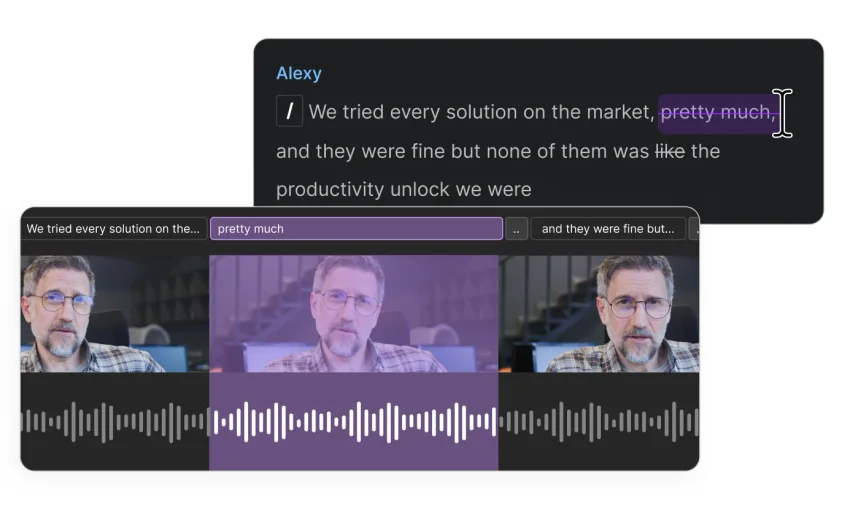
One of Descript’s signature functionalities is text-based editing. Users can edit audio and video files by editing their transcripts. For example, deleting a word from the transcript removes the corresponding portion of the media. This approach simplifies the editing process, particularly for users who are more comfortable with text than with traditional audio/video waveforms.
2. Automatic Transcription
Descript offers automatic transcription of audio and video content. The software converts spoken words into text, allowing users to review and edit content efficiently. Transcription accuracy depends on factors such as audio quality, accents, background noise, and speech clarity. Users may need to manually correct errors in the transcript for precise results.
3. Screen Recording and Video Editing
Descript allows for screen recording and basic video editing. Users can capture their desktop or specific application windows, add voiceovers, and edit video content in conjunction with audio tracks. This feature can be useful for creating tutorials, product demonstrations, and educational videos.
4. Overdub and AI Voice Synthesis
The platform provides an AI-assisted voice synthesis tool called Overdub. Users can generate synthetic speech from text, which can be used to replace or correct audio recordings. This feature requires careful configuration and may involve a verification process to ensure voice consistency. Ethical considerations are advised when using AI-generated voices.
5. Multi-Track Editing
Descript supports multi-track audio and video editing, allowing users to combine multiple recordings, overlays, and music tracks. This functionality facilitates more complex projects, such as podcasts with multiple speakers or video projects with layered content.
6. Collaboration Tools
Descript includes collaboration features that enable multiple users to work on the same project. Team members can make edits, leave comments, and review content in real time, supporting distributed workflows and group projects.
7. Screen Captions and Subtitles
Users can automatically generate captions for video content, which can improve accessibility and provide textual references for audiences. The accuracy of captions depends on the quality of the transcription and may require manual adjustments.
Common Use Cases
Descript is employed across various domains, with practical applications for both individual creators and organizations.
-
Podcasters: Descript simplifies audio editing by allowing podcasters to edit their recordings using text. Multi-track support enables easy integration of multiple speakers and background music.
-
Video Educators: Educators and instructional designers can use Descript to create video lectures, tutorials, and training material with synchronized captions.
-
Marketing Teams: Marketing professionals may use the platform to produce video content, screen recordings, and promotional material, particularly for internal presentations or social media.
-
Journalists and Researchers: Automatic transcription allows for efficient handling of interviews, focus group recordings, or research discussions.
-
Corporate Communications: Teams can create training videos, explainer videos, or meeting summaries that combine audio, video, and textual content in one project.
By streamlining these tasks within a single platform, Descript can reduce the time spent switching between software and performing repetitive tasks such as transcription and captioning.
Potential Advantages
The following are potential advantages of using Descript:
-
Integrated Workflow: Users can handle recording, transcription, editing, and collaboration in one interface, potentially simplifying the production process.
-
Text-Based Editing: Editing audio and video through transcripts can be more intuitive for users comfortable with written content.
-
Collaboration Capabilities: Real-time team collaboration can improve efficiency in multi-person projects.
-
Accessibility Features: Automatic captions and transcription may support accessibility requirements and help reach broader audiences.
-
AI-Assisted Features: Tools like Overdub can save time when making minor audio corrections or adjustments.
It is important to note that these advantages are context-dependent and may vary based on individual needs, project complexity, and technical proficiency.
Limitations & Considerations
Despite its features, Descript has certain limitations and considerations:
-
Learning Curve: Users unfamiliar with text-based editing may require time to adapt. Multi-track video and audio editing still involve a degree of technical skill.
-
Transcription Accuracy: Automatic transcription may not be fully accurate, particularly in noisy environments, for specialized terminology, or for speakers with strong accents.
-
Hardware Requirements: Editing high-resolution video or multi-track audio may require devices with sufficient processing power and memory.
-
AI Voice Limitations: Overdub and voice synthesis may not perfectly replicate natural speech patterns, and ethical considerations should be observed when generating synthetic voices.
-
Pricing Considerations: While not discussed in detail, subscription models and feature tiers may influence accessibility for casual users or those with budget constraints.
-
File Size and Export Options: Large video or audio projects may result in substantial file sizes, and export options may vary depending on the software version.
Users should evaluate these factors carefully to determine if Descript aligns with their project requirements.
Who Should Consider Descript
Descript may be suitable for:
-
Individuals producing podcasts or video content regularly.
-
Educators creating online lessons or tutorial videos.
-
Teams requiring collaborative editing of multimedia projects.
-
Users seeking integrated transcription and captioning features.
It may also be valuable for professionals who prefer an interface that blends text editing with audio/video manipulation, particularly when managing iterative content revisions.
Who May Want to Avoid It
Descript may not be ideal for:
-
Users with minimal technical proficiency seeking fully automated, hands-off solutions.
-
Projects requiring highly specialized audio or video editing techniques that exceed Descript’s capabilities.
-
Users working on extremely large-scale productions where traditional professional software may offer more advanced features or control.
-
Individuals or organizations with strict offline-only requirements, as some features rely on internet connectivity.
Evaluating alternatives is advisable for these use cases.
Comparison With Similar Descript
Several other tools offer overlapping functionalities:
-
Adobe Premiere Pro: Focuses on professional video editing with detailed control, but lacks Descript’s text-based audio editing approach.
-
Audacity: Open-source audio editing software suitable for detailed audio manipulation, but without integrated transcription or video editing.
-
Otter.ai: Primarily transcription-focused, suitable for converting audio to text, but with limited editing or video integration.
-
Camtasia: Combines screen recording and video editing, but does not offer Descript’s text-based editing and AI voice synthesis.
Each tool has strengths and limitations depending on workflow requirements, and choosing between them requires careful evaluation of individual project needs.
Final Educational Summary
Descript provides an integrated platform for audio, video, and transcription-based editing, aimed at simplifying multimedia workflows. Its text-based editing, collaboration tools, and AI-assisted features may appeal to content creators, educators, and teams handling iterative projects. Limitations related to transcription accuracy, learning curve, and hardware requirements should be considered, and users may benefit from comparing Descript with alternative tools for audio and video production.
This article is intended for informational purposes only, encouraging independent evaluation of software tools based on specific requirements and workflows.
Disclosure: This article is for educational and informational purposes only. Some links on this website may be affiliate links, but this does not influence our editorial content or evaluations. Readers should independently assess tools based on their own requirements before making any decisions.