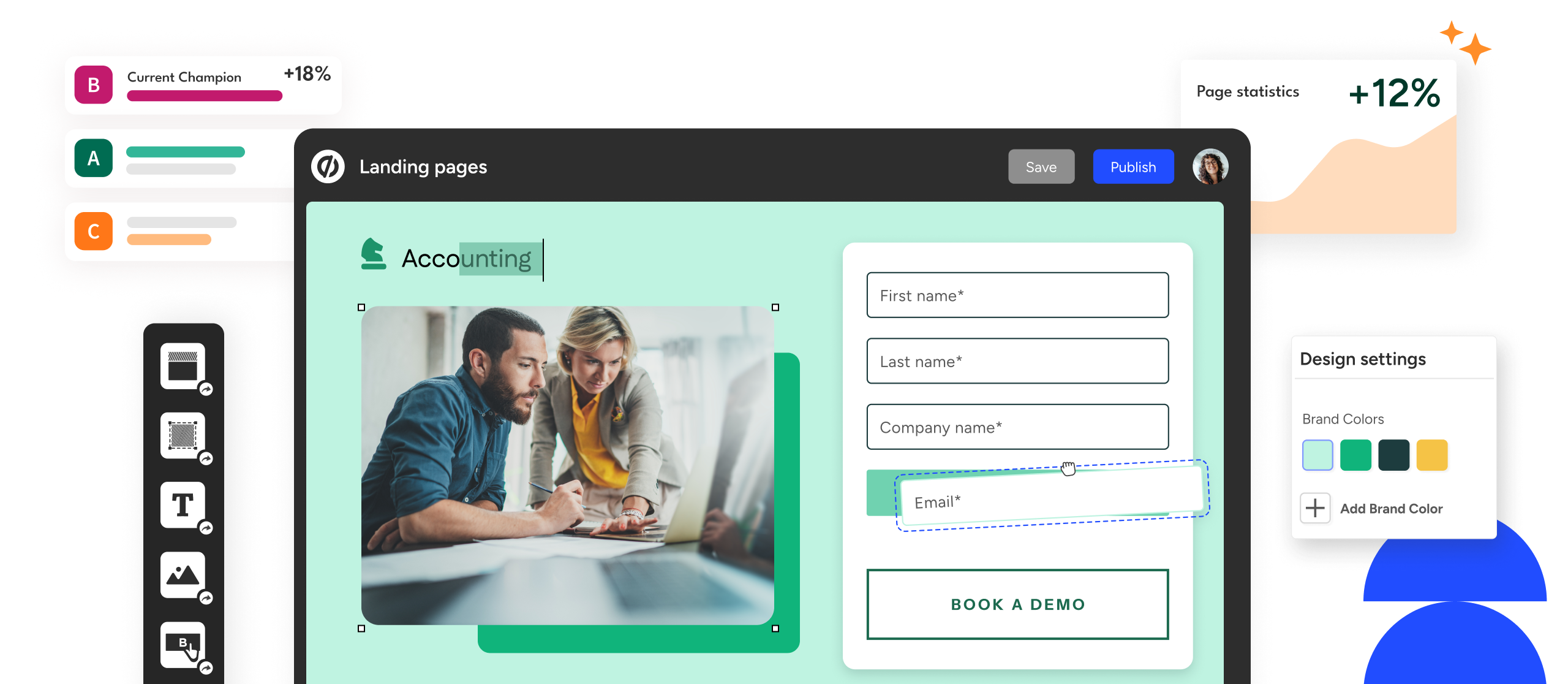
In today’s digital landscape, businesses face the challenge of converting online traffic into tangible results. Whether it’s leads, sales, or sign-ups, the effectiveness of a landing page can directly influence the success of marketing campaigns. Unbounce is a platform that addresses this challenge by providing tools to design, test, and optimize landing pages for higher conversion rates. Understanding how it works, its features, and best practices can empower marketers and businesses to achieve more meaningful engagement from their online audiences.
Understanding Unbounce
At its core, Unbounce is a cloud-based landing page builder designed for marketing professionals, agencies, and businesses of all sizes. Unlike general website builders, Unbounce focuses exclusively on creating high-performing, campaign-specific pages. Its primary goal is to help users capture leads, drive conversions, and enhance the effectiveness of online advertising campaigns.
The platform emphasizes ease of use, allowing non-technical users to create pages with intuitive drag-and-drop tools, customizable templates, and advanced conversion-focused features. By providing detailed analytics and testing capabilities, Unbounce also ensures that users can continuously optimize campaigns based on real-world performance.
Key Features of Unbounce
The value of Unbounce lies in its specialized features, which focus on maximizing conversion rates:
-
Drag-and-Drop Page Builder
The intuitive interface allows users to place elements such as text, images, buttons, and forms without any coding experience. This makes campaign creation faster and more efficient, giving marketers more control over design and layout. -
High-Converting Templates
Pre-designed templates are built with conversion psychology in mind. They provide a starting point that can be customized to match branding, campaign goals, and target audience behavior. -
A/B Testing
A core component of Unbounce is its A/B testing functionality. Marketers can test multiple versions of a landing page simultaneously, compare performance metrics, and identify which design, copy, or CTA generates the highest conversions. -
Popups and Sticky Bars
Beyond landing pages, Unbounce allows the creation of popups and sticky bars to capture leads, promote offers, or highlight key messages. These tools can be triggered based on user behavior to increase engagement without being intrusive. -
Dynamic Text Replacement
This feature automatically adjusts content based on user search terms or location, delivering personalized messaging that improves relevance and engagement. -
Analytics and Integrations
Unbounce tracks user interactions, conversion rates, and other key metrics. Integrations with CRM systems, email marketing platforms, and analytics tools enable a seamless workflow and data-driven decision-making.
Advantages of Using Unbounce
Implementing Unbounce offers several notable benefits for digital marketers:
-
Streamlined Campaign Creation: Launch campaigns quickly without relying on developers.
-
Conversion Optimization: Built-in tools allow iterative improvements through testing and analytics.
-
Accessibility: Minimal technical knowledge is required, making it suitable for small businesses and teams.
-
Versatility: From lead generation to event sign-ups, the platform supports various marketing objectives.
-
Data-Driven Insights: Performance tracking enables informed decisions and strategy adjustments.
Limitations to Consider
While Unbounce offers many benefits, it’s important to consider its limitations:
-
Cost: The platform can be expensive for small businesses with limited marketing budgets.
-
Advanced Features Require Learning: Features like dynamic text replacement or complex integrations may require additional time to master.
-
Design Constraints: Highly customized designs beyond templates may require extra effort or technical knowledge.
Practical Applications
Unbounce is suitable for a wide range of marketing initiatives:
-
Lead Generation: Capture email addresses, contact information, or user sign-ups efficiently.
-
Event Registrations: Create pages for webinars, workshops, or conferences with optimized registration forms.
-
Product Launches: Highlight features, benefits, and pricing in a single, targeted page.
-
Advertising Campaign Optimization: Tailor pages for specific ad campaigns, ensuring high relevance and click-to-conversion ratios.
-
Promotions and Offers: Present limited-time offers with urgency-driven designs to encourage immediate action.
Best Practices for Using Unbounce Effectively
To maximize the potential of Unbounce, marketers should follow these best practices:
-
Craft Clear Headlines: Ensure the main message aligns with user intent.
-
Prioritize Mobile Optimization: Design for mobile-first experiences, as a large portion of traffic comes from mobile devices.
-
Leverage A/B Testing: Continuously test headlines, visuals, and CTAs to identify top-performing variations.
-
Use Visual Hierarchy: Guide the visitor’s attention to key elements such as forms or call-to-action buttons.
-
Personalize Content: Use dynamic text replacement to tailor messaging to individual users or segments.
Alternatives to Unbounce
While Unbounce is a leading platform for landing pages, other tools offer alternatives:
-
Instapage: Focused on post-click optimization and advanced testing features.
-
Leadpages: Provides high-converting templates with simple, efficient lead capture options.
-
ClickFunnels: Designed for multi-step sales funnels and comprehensive campaign creation.
Selecting the right platform depends on factors such as budget, technical skill level, and campaign complexity.
Conclusion
Unbounce provides a robust solution for creating, optimizing, and analyzing landing pages with the ultimate goal of improving conversions. By combining an intuitive editor, customizable templates, advanced testing, and analytics, it enables marketers to design campaigns that resonate with audiences and drive measurable results. While it has cost and learning considerations, the platform’s focus on conversion optimization makes it a valuable asset for marketers seeking data-driven solutions.
Employing best practices, testing frequently, and integrating Unbounce with other marketing tools can enhance digital campaigns, resulting in higher engagement, more leads, and improved return on investment.
Disclosure: This article is written for educational and informational purposes only. It provides an independent overview of the Unbounce platform, its features, benefits, limitations, and use cases. It is not a promotional piece, endorsement, or marketing recommendation. Readers should evaluate the platform based on their individual needs and requirements.