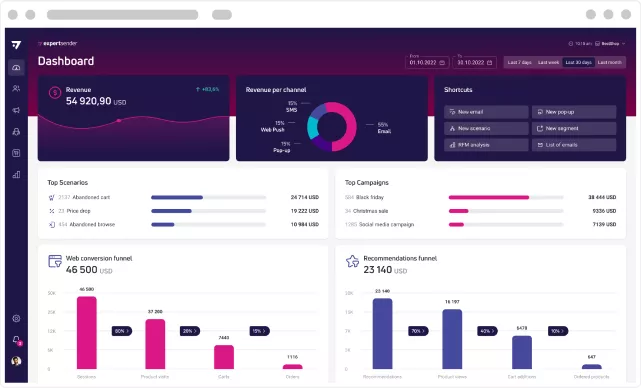
Email marketing platforms are widely used by businesses to manage customer communication, automate messaging, and organize contact lists. These tools exist to help streamline outreach efforts, segment audiences, and analyze engagement data in a structured way. As digital communication has expanded, platforms in this category have evolved to include automation workflows, behavioral tracking, and integration with other systems such as CRM and e-commerce tools.
ExpertSender is one such platform that operates in the email marketing and marketing automation space. It is designed to support businesses in sending targeted emails, managing subscriber data, and creating automated communication sequences based on user behavior or predefined rules. Tools like ExpertSender are typically used by marketing teams, e-commerce operators, and organizations that rely on structured communication with their audiences.
What Is ExpertSender?
ExpertSender is a digital platform categorized under email marketing and marketing automation software. It is designed to help users manage contact databases, send email campaigns, and automate communication workflows based on user interactions or predefined triggers.
The platform typically serves businesses that maintain subscriber lists and need to communicate with customers or prospects at scale. This may include online retailers, subscription-based services, media publishers, and other organizations that rely on recurring communication.
At its core, ExpertSender functions as a system for organizing contacts, creating messages, and delivering them through automated or manual campaigns. It often includes tools for segmentation, which allow users to divide their audience into groups based on attributes such as behavior, demographics, or engagement history.
Marketing teams commonly use such platforms to maintain consistency in communication and reduce the need for manual email handling. ExpertSender fits into this category by providing a centralized environment for managing campaigns and tracking their performance.
Key Features Explained
ExpertSender includes several features commonly associated with email marketing platforms. These features are intended to support communication workflows rather than serve as standalone tools.
One core feature is email campaign management. This allows users to design and send emails to selected segments of their contact list. Campaigns can be scheduled or sent immediately, depending on the user’s requirements.
Another important component is audience segmentation. This feature enables users to categorize contacts based on specific criteria such as activity level, purchase history, or custom attributes. Segmentation helps organize communication but does not guarantee outcomes—it simply structures the audience.
The platform also includes automation workflows. These workflows allow users to set up sequences of emails triggered by specific actions, such as sign-ups or inactivity. Automation rules are typically configured using conditions and triggers defined by the user.
Analytics and reporting tools are also part of the system. These provide insights into metrics such as open rates, click-through rates, and delivery performance. The data helps users understand how campaigns are performing over time.
Integration capabilities are another feature area. ExpertSender may connect with external systems such as e-commerce platforms or customer databases, allowing data to flow between systems for more coordinated communication.
Common Use Cases
ExpertSender is used in several practical scenarios across different types of organizations. One common use case involves e-commerce businesses that send transactional emails, promotional campaigns, or abandoned cart reminders. These businesses rely on structured communication to maintain engagement with customers.
Another use case is lead nurturing. Organizations that collect leads through forms or landing pages may use ExpertSender to send follow-up emails over time. These sequences can be configured to deliver information gradually rather than all at once.
Content publishers and media platforms may also use the tool to distribute newsletters or updates to subscribers. In such cases, segmentation can help tailor content to different audience groups based on interests.
Additionally, companies may use the platform for customer retention communication, such as re-engagement campaigns for inactive users or post-purchase follow-ups. These workflows are typically automated to reduce manual effort.
In all these cases, ExpertSender acts as an infrastructure layer for managing communication rather than determining strategy. The effectiveness of its use depends on how campaigns are designed and executed by the user.
Potential Advantages
One potential advantage of ExpertSender is centralized contact management. Having subscriber data in one place can help organizations maintain organized records and reduce fragmentation across systems.
Another potential benefit is workflow automation. Automation features can reduce repetitive tasks by enabling predefined sequences of communication. This may help teams maintain consistency in messaging without manually sending each email.
Segmentation capabilities can also support more structured communication strategies. By grouping audiences based on defined criteria, users can organize campaigns in a more targeted manner.
The platform’s reporting tools may provide visibility into campaign performance. Metrics such as engagement rates can help users observe patterns and adjust their strategies accordingly.
These advantages are situational and depend on how the platform is implemented within an organization’s workflow. They do not guarantee improved outcomes but provide tools that can assist in organizing communication efforts.
Limitations & Considerations
ExpertSender, like other marketing platforms, has certain limitations that users should evaluate before adopting it.
One consideration is the learning curve. Setting up automation workflows, segmentation rules, and integrations may require time and familiarity with marketing concepts. Users who are new to such systems may need to invest effort in understanding how the platform operates.
Another limitation is dependency on data quality. The effectiveness of segmentation and automation depends heavily on the accuracy and completeness of contact data. Inconsistent or outdated data can affect how campaigns are structured.
Integration complexity may also be a factor. Connecting the platform with other systems such as e-commerce stores or CRMs may require technical configuration. The level of difficulty can vary depending on the user’s environment.
Pricing structure and feature availability may also influence usability. Some features may be tied to specific plans or usage tiers, which could affect how the platform is implemented in different organizations.
Finally, as with any third-party service, users may need to consider reliability and deliverability factors. Email delivery depends on multiple external variables, including sender reputation and email service providers.
Who Should Consider ExpertSender
ExpertSender may be relevant for organizations that rely on structured email communication and require tools for managing campaigns, segmentation, and automation. This includes e-commerce businesses, marketing teams, and content-driven platforms that maintain subscriber lists.
It may also be suitable for teams that prefer centralized systems for handling contact data and campaign workflows. Users who are comfortable working with automation rules and segmentation logic may find it easier to integrate into their processes.
Who May Want to Avoid It
Individuals or organizations with very simple communication needs may find ExpertSender more complex than necessary. For example, users who only need basic email sending without automation or segmentation might not require a full-featured platform.
It may also be less suitable for those who prefer minimal setup or do not have the time to manage campaign configurations, integrations, or data organization.
Comparison With Similar Tools
ExpertSender belongs to the broader category of email marketing and automation platforms. Similar tools in this category often include features such as campaign management, segmentation, automation workflows, and analytics.
| Aspect | ExpertSender | Similar Platforms |
|---|---|---|
| Email Campaigns | Supported | Common across tools |
| Automation Workflows | Available | Widely available |
| Segmentation | Included | Standard feature |
| Integrations | Varies | Typically offered |
| Learning Curve | Moderate | Varies by platform |
Differences between platforms often relate to interface design, integration options, scalability, and depth of automation features. No single platform is universally suitable for all users.
Final Educational Summary
ExpertSender is an email marketing and automation platform designed to help organizations manage communication with their audiences. It provides tools for campaign management, segmentation, automation, and reporting, all of which contribute to structured handling of subscriber data and messaging workflows.
Its usefulness depends on how it is implemented and the specific needs of the user or organization. Factors such as data quality, technical setup, and familiarity with marketing workflows all play a role in determining how effectively the platform can be used.
Readers should evaluate tools like ExpertSender based on their own requirements, operational goals, and available resources. Comparing multiple options and understanding how each one fits into a broader communication strategy can provide better clarity.
Disclosure: This article is for educational and informational purposes only. Some links on this website may be affiliate links, but this does not influence our editorial content or evaluations.