
Introduction
Email campaigns are a key component of professional communication, but managing them at scale can be challenging. Without proper organization, teams risk sending inconsistent messages, missing follow-ups, and failing to track results effectively. Traditional email tools lack the workflow and automation features necessary for structured campaigns.
Instantly addresses these challenges by providing a platform that combines automation, multi-account management, and campaign tracking. This article provides an educational overview of how Instantly organizes campaigns, outlining its structure, tools, practical use cases, advantages, limitations, and considerations, all from a neutral perspective.
Platform Overview
Instantly is a cloud-based email automation tool designed for professional outreach. Unlike conventional email clients, it enables users to create structured campaign workflows and manage multiple accounts simultaneously.
Key functionalities include:
- Workflow Design: Organize sequences with initial emails and follow-ups
- Team or Multi-User Access: Coordinate campaigns across users
- Basic Reporting: Track engagement such as opens, replies, and bounces
Typical users include marketing teams, sales teams, recruitment teams, freelancers, and agencies.
Campaign Structure in Instantly
Sequence Creation
A campaign in Instantly is composed of email sequences:
- Initial outreach email
- Conditional follow-ups triggered by recipient behavior
- Scheduled intervals for consistent delivery
Sequences are customizable, and personalization fields such as name or company can be added. This ensures campaigns remain structured while maintaining relevance.
Multi-Account Distribution
To manage sending limits and improve deliverability, Instantly allows multiple accounts to be connected to a single campaign. Users can:
- Rotate sending across accounts
- Monitor individual account health
- Reduce the risk of emails being marked as spam
This feature is particularly useful for agencies or large teams managing multiple client campaigns.
Automation Features
Automation in Instantly extends beyond follow-ups:
- Auto-scheduling of emails based on time or recipient actions
- Conditional logic for stopping sequences when replies are received
- Automatic error handling for bounced or undeliverable messages
These tools save time, reduce human error, and maintain consistent outreach.
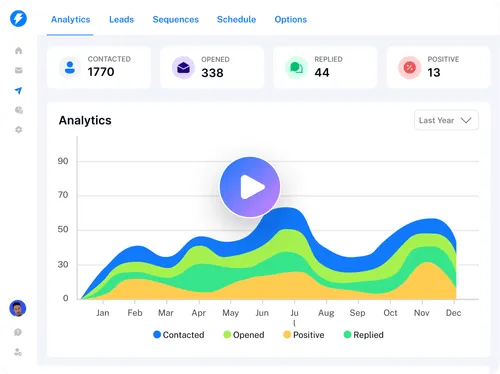
Reporting and Analytics
Instantly provides essential metrics to monitor campaigns:
- Open rates
- Reply rates
- Bounce rates
These analytics are directional, helping teams adjust strategies and workflows. While basic, they provide sufficient insight for evaluating engagement patterns.
Practical Use Cases
- Sales Teams: Automating lead outreach while keeping workflows organized
- Recruitment Teams: Coordinating candidate outreach sequences
- Agencies: Handling campaigns for multiple clients with consistent messaging
- Freelancers or Consultants: Scaling communication without manual sending
Potential Advantages
- Efficiency: Reduces repetitive tasks and manual oversight
- Consistency: Maintains structured communication across campaigns
- Scalability: Multi-account support enables handling larger audiences
- Insightful Data: Basic analytics guide workflow improvements
Effectiveness depends on setup quality, message personalization, and contact accuracy.
Limitations & Considerations
- Technical Complexity: Requires understanding of workflows and multi-account setup
- Deliverability Factors: External email server rules and domain reputation influence results
- Compliance Obligations: Users must adhere to GDPR, CAN-SPAM, or local regulations
- Data Accuracy: Campaign success relies on clean, updated contact lists
Who Should Consider Instantly
- Teams and agencies managing structured email campaigns
- Professionals coordinating multi-account outreach
- Users familiar with automation and campaign metrics
Who May Want to Avoid It
- Casual or personal email users
- Professionals preferring fully manual outreach
- Those unfamiliar with compliance or deliverability considerations
Comparison Table: Workflow & Feature Focus
| Feature | Instantly | Woodpecker | Mixmax |
|---|---|---|---|
| Campaign Sequences | Yes | Yes | Yes |
| Multi-Account Management | Yes | Limited | No |
| Conditional Automation | Yes | Yes | Limited |
| Engagement Tracking | Basic | Moderate | Advanced |
| Team Collaboration | Optional | No | Yes |
This table focuses on workflow and team collaboration capabilities, offering a fresh comparison from previous articles.
Best Practices for Campaign Organization
- Plan Sequences Carefully: Map follow-ups based on realistic timelines
- Monitor Account Health: Rotate multi-accounts to reduce deliverability risks
- Personalize Messages: Insert relevant variables to maintain engagement
- Analyze Data: Use open and reply metrics to refine workflows
- Maintain Compliance: Ensure all emails adhere to relevant regulations
Final Educational Summary
Instantly provides a structured environment for organizing professional email campaigns, combining workflow automation, multi-account management, and basic reporting. Its effectiveness depends on setup quality, personalization, contact accuracy, and compliance awareness. Professionals should evaluate the platform based on campaign scale, team structure, and technical skills.
Disclosure: This article is for educational and informational purposes only. Some links on this website may be affiliate links, but this does not influence our editorial content or evaluations.
