
Introduction
As work environments become increasingly distributed and interdisciplinary, traditional methods of collaboration—such as in-person meetings, static documents, and linear communication tools—often struggle to keep pace. Teams working across time zones and functional areas require systems that support real-time interaction, visual thinking, and flexible information structuring. This demand has led to the rise of digital collaboration platforms designed to replicate and expand upon the capabilities of physical whiteboards.
Visual collaboration tools have emerged as a distinct category within productivity software, offering shared digital canvases where users can brainstorm, map ideas, and organize complex workflows. These tools address challenges such as fragmented communication, lack of clarity in planning, and difficulty in aligning team understanding. Within this category, Miro is one of the widely recognized platforms designed to facilitate collaborative thinking through a visual interface.
What Is Miro?
Miro is an online collaborative whiteboard platform that allows individuals and teams to create, organize, and share visual content in real time. It falls within the broader category of visual collaboration software, often used in conjunction with project management, design, and remote teamwork tools.
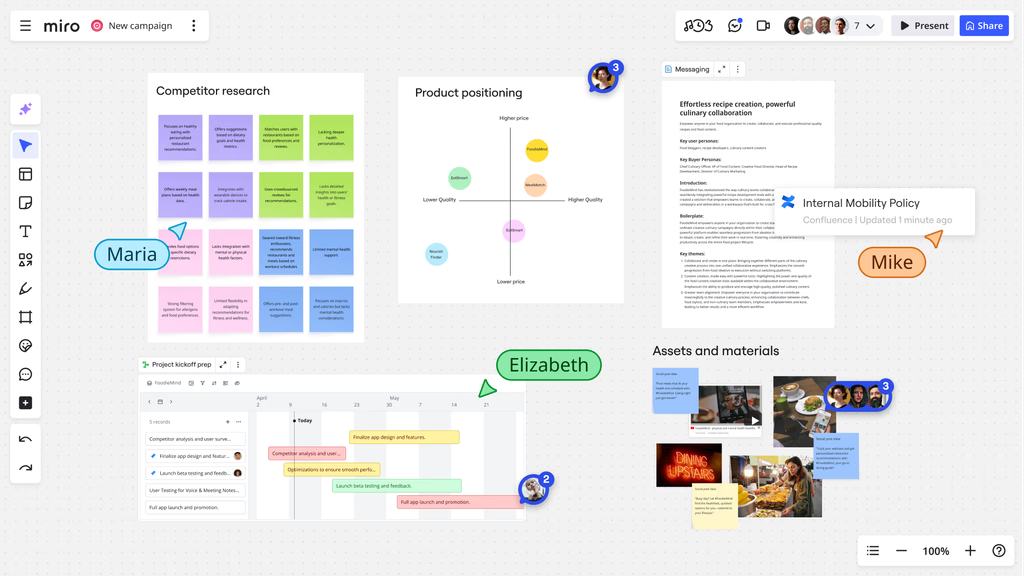
The platform provides an infinite canvas where users can add elements such as sticky notes, diagrams, images, text, and embedded content. It is accessible through web browsers and dedicated applications, supporting synchronous and asynchronous collaboration.
Miro is commonly utilized in environments where ideation, planning, and visual communication are essential. It integrates with a range of third-party tools, enabling it to function as part of a larger digital workflow ecosystem.
Key Features Explained
Infinite Canvas and Flexible Workspace
One of the defining characteristics of Miro is its infinite canvas. Unlike traditional document-based tools, the workspace is not constrained by predefined page limits. Users can expand their boards indefinitely, which allows for the development of complex diagrams, mind maps, and project layouts without spatial restrictions.
This flexibility supports non-linear thinking, making it suitable for brainstorming sessions where ideas evolve dynamically.
Real-Time Collaboration
Miro supports simultaneous editing by multiple users. Participants can view cursor movements, make changes, and leave comments in real time. This feature is particularly relevant for remote teams that require interactive sessions similar to physical workshops.
Additional collaboration tools include voting systems, timers, and presentation modes, which can structure group activities.
Template Library
The platform includes a wide range of pre-designed templates covering areas such as agile workflows, user journey mapping, product roadmaps, and strategic planning. These templates provide structured starting points for users unfamiliar with visual frameworks.
Templates can reduce setup time and help standardize processes across teams.
Integration Capabilities
Miro integrates with commonly used tools in project management, communication, and design. Examples include issue tracking systems, cloud storage platforms, and video conferencing applications. These integrations allow users to embed external content directly into boards or synchronize data across platforms.
Such connectivity supports continuity in workflows, minimizing the need to switch between multiple applications.
Visual Elements and Content Types
Users can add a variety of elements to their boards, including:
-
Sticky notes for quick idea capture
-
Flowcharts and diagrams for process visualization
-
Images and videos for contextual information
-
Tables and grids for structured data
-
Embedded documents from external tools
This diversity enables different forms of expression within a single workspace.
Permissions and Access Control
Miro offers different levels of access control, allowing board owners to define who can view, comment, or edit content. This is relevant in collaborative environments where information sensitivity or role-based access is a consideration.
Common Use Cases
Brainstorming and Ideation
Teams frequently use Miro for brainstorming sessions where participants contribute ideas in real time. The visual layout helps organize thoughts into clusters, making it easier to identify themes and patterns.
Agile and Scrum Workflows
Miro supports agile methodologies through templates and integrations that align with sprint planning, backlog management, and retrospective meetings. Teams can visualize workflows and track progress within a shared environment.
Product Development Planning
Product managers and cross-functional teams use Miro to map product roadmaps, define user journeys, and outline feature requirements. The visual format helps communicate complex ideas across departments.
Remote Workshops and Training
Facilitators use Miro to conduct workshops, training sessions, and collaborative exercises. Interactive elements such as voting and timers can structure activities and encourage participation.
Design Collaboration
Design teams can use Miro to sketch concepts, share wireframes, and gather feedback. While it is not a replacement for specialized design software, it serves as a complementary tool for early-stage ideation.
Strategic Planning
Organizations may use Miro for high-level planning activities, such as SWOT analysis, business model canvases, and goal-setting exercises. The platform supports the visualization of relationships between different strategic components.
Potential Advantages
Enhanced Visual Communication
Miro enables users to represent ideas visually, which can improve understanding compared to text-based communication. Complex concepts can be broken down into diagrams and visual structures.
Support for Remote Collaboration
The platform is designed with distributed teams in mind. Real-time interaction, combined with asynchronous access, allows participants to contribute regardless of location or time zone.
Versatility Across Disciplines
Miro is not limited to a single use case or industry. It can be adapted for education, business strategy, software development, and creative work, making it a flexible tool.
Centralized Workspace
By consolidating multiple types of content into a single board, Miro can serve as a central hub for project-related information. This reduces fragmentation across different tools.
Structured Yet Flexible Workflows
Templates and frameworks provide structure, while the open canvas allows customization. This balance can accommodate both standardized processes and creative exploration.
Limitations & Considerations
Learning Curve for New Users
Although the interface is visually intuitive, users unfamiliar with digital whiteboard tools may require time to understand navigation, features, and best practices.
Performance With Large Boards
Boards with extensive content can become complex and may affect performance, especially on lower-end devices or slower internet connections. Managing large datasets visually can also become challenging.
Dependence on Internet Connectivity
As a cloud-based platform, Miro requires a stable internet connection for full functionality. Offline capabilities are limited, which may affect accessibility in certain environments.
Potential for Overcrowding
The flexibility of the canvas can lead to cluttered boards if not managed properly. Without clear organization, information may become difficult to interpret.
Not a Specialized Tool for All Tasks
While Miro supports many workflows, it may not replace dedicated tools for specific functions such as advanced design, detailed project tracking, or data analysis.
Who Should Consider Miro
Distributed Teams
Organizations with remote or hybrid work models may benefit from Miro’s collaborative features, particularly when visual communication is a priority.
Product and Project Managers
Professionals involved in planning, coordination, and stakeholder communication can use Miro to present ideas and track workflows visually.
Educators and Trainers
Teachers and facilitators may find value in using Miro for interactive lessons, group activities, and collaborative learning environments.
Creative Professionals
Designers, writers, and strategists can use the platform for brainstorming and concept development.
Consultants and Facilitators
Individuals leading workshops or strategy sessions may use Miro to structure discussions and document outcomes in real time.
Who May Want to Avoid It
Users Seeking Simple Task Management
Individuals looking for straightforward task tracking without visual complexity may find Miro more elaborate than necessary.
Environments With Limited Internet Access
Since the platform relies on cloud connectivity, users in low-connectivity settings may encounter limitations.
Teams Requiring Highly Specialized Tools
For tasks such as detailed software development tracking or advanced graphic design, dedicated tools may be more suitable.
Users Preferring Minimal Interfaces
Those who prefer minimalistic, text-based tools might find the visual nature of Miro overwhelming.
Final Educational Summary
Miro represents a category of tools designed to facilitate visual collaboration in increasingly digital and distributed work environments. Its core functionality revolves around providing an expansive, flexible workspace where users can organize ideas, collaborate in real time, and integrate multiple forms of content.
The platform’s strengths lie in its adaptability, visual communication capabilities, and support for collaborative workflows. At the same time, considerations such as usability, performance, and suitability for specific tasks should be evaluated based on individual or organizational needs.
Understanding where Miro fits within the broader landscape of productivity and collaboration tools can help users determine whether it aligns with their workflow requirements. As with many digital tools, its effectiveness depends on how it is implemented and integrated into existing processes.
