
Introduction
The rapid expansion of digital services has created an environment where individuals and organizations must maintain access credentials for dozens, sometimes hundreds, of online platforms. Email accounts, financial portals, collaboration software, cloud infrastructure dashboards, and internal databases all require authentication. As a result, password management has become a persistent operational challenge.
Historically, many users stored passwords in notebooks, spreadsheets, or unencrypted text files. These approaches introduced risks such as accidental exposure, duplication of credentials, and difficulty managing updates across teams. The broader cybersecurity industry responded to this problem by developing dedicated password management tools. These systems attempt to centralize credential storage, organize authentication information, and control access across multiple users.
Within this category of digital security software, several platforms provide cloud-based password management with encryption and access controls. One such platform is Passpack. Examining how tools like Passpack operate can provide insight into modern credential management practices, particularly for small organizations, distributed teams, and individuals who manage multiple secure logins.
This article presents an analytical overview of Passpack, focusing on its features, typical use cases, advantages, and limitations within the wider password management ecosystem.
What Is Passpack?
Passpack is a cloud-based password management platform designed to store, organize, and share login credentials securely. The service belongs to the broader category of password vault software, which encrypts authentication information and makes it accessible through a centralized interface.
Rather than relying on local files or manual storage methods, Passpack places credentials inside an encrypted digital vault hosted through a web-based infrastructure. Users access the vault using a master password, which functions as the primary authentication method. Once authenticated, users can retrieve stored credentials, manage access permissions, and organize login data.
A defining characteristic of Passpack is its focus on secure password sharing within groups. Many password management tools target individual consumers, but Passpack historically emphasizes collaborative environments where multiple users require controlled access to shared credentials.
From a technical classification perspective, Passpack operates as:
-
A cloud password manager
-
A secure credential vault
-
A team password sharing system
-
A web-based security management tool
The system is typically accessed through a web interface and may support browser integration for managing credentials during login processes. By encrypting stored information before it reaches the server, the platform attempts to reduce the risk of unauthorized access.
Key Features Explained
Password management platforms vary widely in their capabilities. Passpack includes several features designed to organize credentials and manage secure access within teams.
Encrypted Password Vault
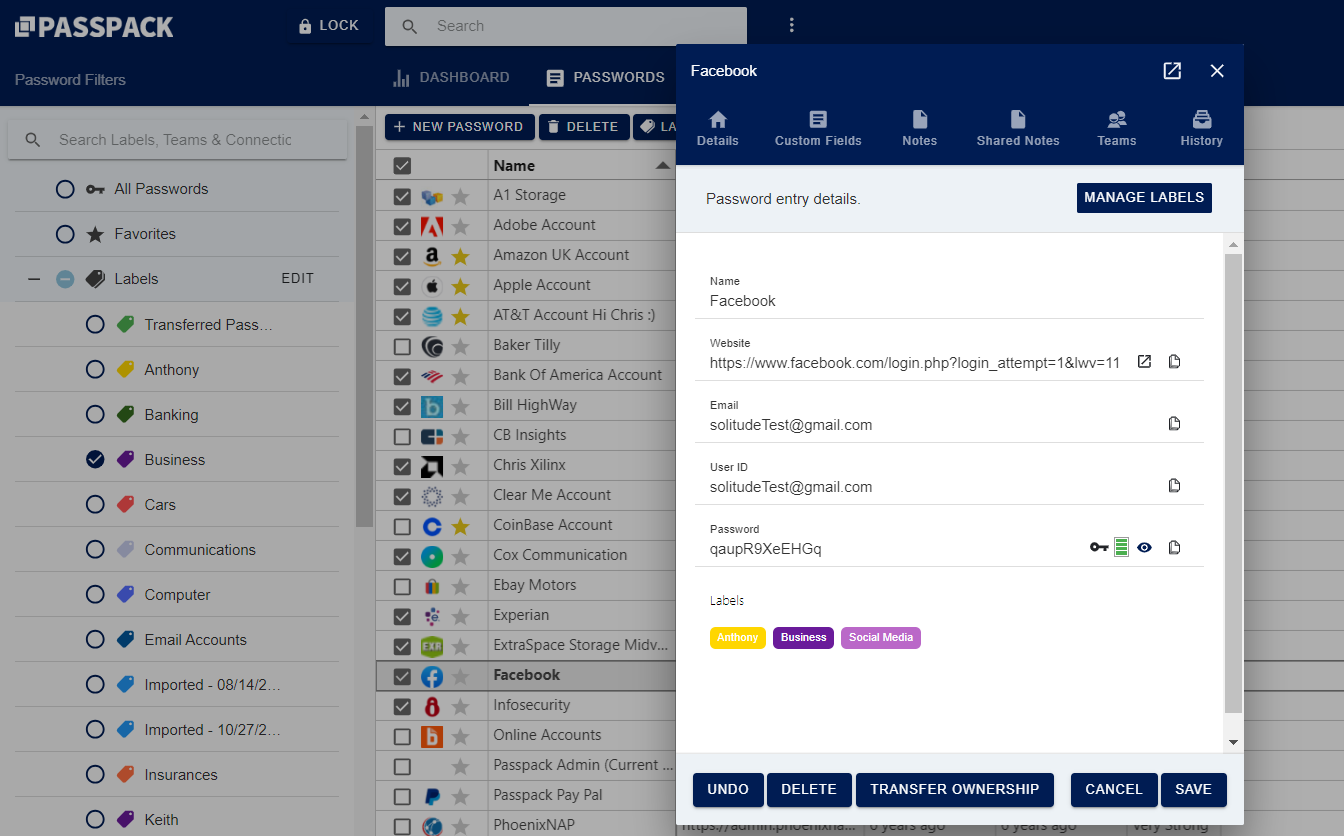
At the center of Passpack is an encrypted vault used to store authentication credentials. Each entry may contain a website name, login username, password, and optional notes.
Encryption helps protect stored credentials from unauthorized viewing. In many password manager designs, encryption occurs before data is transmitted to the service provider’s servers. This approach attempts to ensure that sensitive information remains unreadable without the user’s master password.
Password Organization Tools
Large credential collections quickly become difficult to manage without proper organization. Passpack allows users to categorize entries, label passwords, and maintain structured records.
These organizational tools can help users manage multiple accounts across different services, particularly when credentials change frequently or when multiple departments share access to online systems.
Secure Password Sharing
One of the distinguishing elements of Passpack is its ability to share credentials between users without revealing the actual password in plain text.
For example, a team administrator might grant a colleague access to a login account while preventing them from copying or modifying the password. This capability can be useful in collaborative environments where multiple users must access the same systems.
Role-Based Permissions
Role-based access control allows administrators to define which users can view, edit, or manage certain credentials.
In practice, this means:
-
Some users may only access specific passwords.
-
Others may manage password entries.
-
Administrative roles may control user permissions and group structures.
This hierarchical structure is common in team password management tools, particularly in workplaces where credential access must follow internal policies.
Password Generation
Many password management systems include tools that generate complex passwords automatically. Passpack provides a password generator designed to create strong, randomized credentials.
Generated passwords typically combine letters, numbers, and special characters. The goal is to reduce reliance on predictable passwords such as simple words, dates, or reused credentials.
Password History and Version Tracking
In environments where credentials change frequently, tracking previous versions can be helpful. Passpack allows users to maintain records of password updates and modifications.
Version history can help teams verify when credentials were changed and who performed the update.
Web-Based Accessibility
Because Passpack operates as a cloud platform, users can access their password vault through a web browser from different locations. This accessibility is particularly useful for distributed teams and remote work environments.
Common Use Cases
Password management tools like Passpack appear in several real-world contexts where secure credential handling is necessary.
Small Business Credential Management
Small organizations often maintain access to many third-party platforms such as marketing tools, analytics dashboards, and financial systems. Passpack can function as a centralized repository for these credentials.
Instead of distributing passwords through email or messaging platforms, teams may store them inside a controlled vault.
Web Development and IT Teams
Developers and IT administrators frequently manage login credentials for hosting panels, databases, cloud servers, and staging environments.
A shared password management system can help teams maintain secure access without duplicating credentials across multiple unsecured documents.
Digital Agencies Managing Client Accounts
Agencies responsible for managing client platforms—such as advertising dashboards or social media management tools—often need structured password access.
Passpack can store credentials while allowing different team members to access the accounts they manage.
Remote Team Collaboration
Distributed work environments require systems that allow secure access to internal resources regardless of location. Cloud password managers can help maintain consistency when employees work across multiple regions or time zones.
Personal Password Organization
Although some tools focus primarily on enterprise environments, individuals with large numbers of accounts may also use password management software to organize personal login credentials.
Potential Advantages
Several factors contribute to the adoption of password management platforms like Passpack.
Centralized Credential Storage
Storing passwords in a single encrypted location reduces reliance on scattered files or handwritten records. This approach can improve organization and reduce the risk of forgotten credentials.
Improved Password Complexity
Password generators encourage the use of stronger authentication credentials. Complex passwords are generally harder to guess or brute-force.
Controlled Sharing
Passpack allows credentials to be shared within teams without directly revealing the underlying password. This can support internal security policies where certain users should not see full credentials.
Reduced Password Reuse
Password reuse is a common security risk. By storing multiple complex passwords in a vault, users are less likely to reuse the same credentials across multiple services.
Access Control and Permission Management
Administrative control over credential access allows organizations to enforce security rules, such as limiting who can modify or distribute certain passwords.
Limitations & Considerations
Despite the advantages, password management tools are not without potential drawbacks.
Dependence on a Master Password
Most password vault systems rely on a single master password for access. If this master password is forgotten or compromised, users may face significant challenges recovering or securing their stored credentials.
Cloud Infrastructure Risks
Although encryption helps protect data, cloud-based services still depend on remote infrastructure. Some organizations prefer local or self-hosted solutions due to internal security policies.
Learning Curve for Teams
Teams unfamiliar with password management systems may require time to adapt to new workflows. For example, employees accustomed to sharing credentials through messaging platforms may need to adjust their habits.
Limited Offline Access
Because Passpack is primarily web-based, access to stored credentials typically requires an internet connection. Users in environments with restricted connectivity may experience limitations.
Compatibility With Other Security Systems
Organizations that already use enterprise identity management tools or single sign-on infrastructure may evaluate whether a separate password vault aligns with their existing security architecture.
Who Should Consider Passpack
Passpack may be relevant for several types of users and organizations.
Small and Medium-Sized Businesses
Companies without dedicated enterprise password management infrastructure may use a cloud vault to manage shared credentials.
Freelancers and Consultants
Professionals managing multiple client accounts can benefit from organized credential storage and controlled sharing.
IT Support Teams
Support personnel responsible for maintaining multiple administrative logins may find centralized password organization useful.
Digital Agencies
Agencies working with numerous client dashboards often require structured credential management across internal teams.
Who May Want to Avoid It
While password management tools serve many environments, they may not suit every use case.
Organizations With Enterprise Identity Platforms
Companies using advanced identity management systems, such as single sign-on or centralized authentication servers, may already have credential management solutions integrated into their infrastructure.
Users Seeking Fully Offline Password Managers
Individuals who prefer locally stored password vaults rather than cloud-based systems may look for desktop-focused password managers.
Highly Regulated Environments
Certain industries with strict compliance rules may require internally hosted security systems rather than third-party cloud services.
Comparison With Similar Tools
Passpack operates within a competitive field that includes many password management platforms designed for both individuals and organizations.
Broadly speaking, password managers can be categorized into three groups:
Individual password managers – Tools primarily designed for personal use with browser autofill and mobile device integration.
Team password sharing platforms – Systems focused on collaborative credential management and role-based access.
Enterprise identity solutions – Larger platforms integrated with corporate authentication infrastructure.
Passpack sits closer to the second category, where the emphasis is on team password sharing and controlled access rather than full identity management.
Compared with many modern password managers, Passpack’s design philosophy focuses heavily on password vault sharing rather than additional features such as advanced device synchronization, biometric login, or integrated security monitoring.
This narrower focus may simplify the platform for some users while making it less feature-rich than certain enterprise-grade alternatives.
Final Educational Summary
Password management has become an essential aspect of digital security as individuals and organizations maintain increasing numbers of online accounts. Dedicated password vault platforms attempt to address this challenge by storing credentials securely, organizing authentication data, and enabling controlled sharing across users.
Passpack represents one example of a cloud-based password management system designed to centralize credential storage while allowing teams to share access through encrypted infrastructure. Its key functions include password vault storage, credential organization, secure sharing controls, role-based permissions, and password generation.
The platform is commonly used by small businesses, IT teams, freelancers, and agencies that manage multiple login credentials across collaborative environments. At the same time, users must consider factors such as reliance on a master password, cloud infrastructure dependencies, and compatibility with existing security frameworks.
Understanding how tools like Passpack operate provides insight into broader password management strategies used across modern digital systems. As cybersecurity practices continue to evolve, credential management platforms remain an important component of protecting access to online services.
