
Introduction
Managing professional email outreach at scale can quickly become overwhelming without the right tools. Sending hundreds of emails manually is not only time-consuming but also prone to mistakes, missed follow-ups, and inconsistent tracking. For businesses, agencies, and professionals who rely on email to generate leads, recruit talent, or maintain client relationships, structured solutions are essential.
Instantly addresses this challenge by providing a platform that supports multi-account management and workflow automation. Unlike standard email clients, Instantly focuses on creating organized campaigns where sequences, follow-ups, and analytics are integrated into one system. This guide provides a neutral, educational look at how Instantly can be used efficiently to manage multiple email accounts, with insights into its features, workflow, potential benefits, limitations, and practical considerations.
What Is Instantly?
Instantly is a cloud-based email outreach platform designed for professionals managing structured campaigns. It falls under the category of cold email and automation tools, where its primary purpose is to send, track, and follow up on emails efficiently across multiple accounts.
Key features include:
- Workflow-Based Campaigns: Predefined sequences of emails and follow-ups.
- Multi-Account Management: Allows distributing email volume across several accounts.
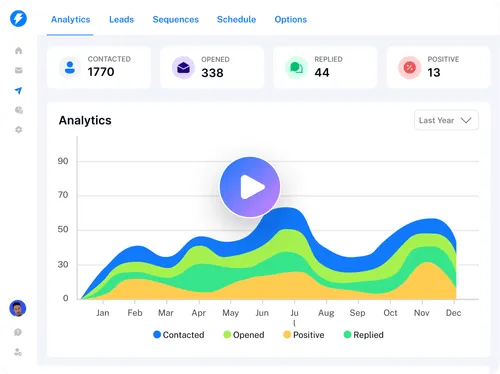
- Analytics: Provides open rates, reply rates, and bounce tracking.
Typical users are:
- Business development teams managing leads
- Recruiters contacting numerous candidates
- Freelancers or consultants reaching prospective clients
- Agencies handling campaigns for multiple clients
Instantly does not provide contact lists or guarantee engagement. Its purpose is to simplify repetitive email outreach and provide structured visibility into campaign performance.
Multi-Account Management
A defining feature of Instantly is the ability to manage multiple email accounts from a single dashboard. Benefits include:
- Distributing sending volume to reduce spam risk
- Managing daily sending limits efficiently
- Supporting large-scale campaigns for multiple audiences
Setting up multiple accounts requires careful authentication and monitoring. Improper configuration may result in deliverability issues or account suspension. Professionals should ensure all accounts are verified and actively maintained.
Workflow Automation
Workflow automation is at the core of Instantly. Users can create campaign sequences with:
- An initial outreach email
- Automated follow-ups triggered by recipient actions (e.g., no reply, email opened)
- Scheduled intervals between messages
Automation ensures consistent outreach, but the relevance and quality of emails remain critical. Personalization, such as inserting recipient names or company details, can improve engagement even in automated sequences.
Follow-Up Automation
Follow-ups are vital in outreach campaigns. Instantly allows users to:
- Set multiple follow-up steps automatically
- Customize timing between follow-ups
- Stop sequences when a recipient replies
Automated follow-ups save time, but poorly planned sequences can appear repetitive. Users must balance automation with thoughtful message content to maintain credibility.
Warm-Up and Deliverability Support
New email accounts often use a warm-up process to gradually increase sending activity. This helps build domain and account reputation, potentially improving deliverability.
However, warm-up is not a guarantee. External factors, such as email content, server policies, and domain reputation, still influence inbox placement. Users must monitor account performance and adjust accordingly.
Analytics and Monitoring
Instantly provides basic performance metrics:
- Open rates
- Reply rates
- Bounce rates
These metrics allow users to evaluate the effectiveness of campaigns. Professionals should interpret these numbers as directional insights rather than definitive proof, as privacy settings and email client behaviors can affect accuracy.
Practical Use Cases
- Lead Generation: Automating outreach to prospective clients while tracking engagement trends.
- Recruitment: Managing communication with multiple candidates efficiently.
- Agency Campaigns: Coordinating email campaigns for several clients simultaneously.
- Freelance Outreach: Scaling client communication without manual sending.
Potential Advantages
- Time Efficiency: Automation reduces repetitive tasks.
- Consistency: Structured workflows maintain uniform communication.
- Scalability: Multi-account support allows larger campaigns.
- Insightful Metrics: Basic analytics inform campaign adjustments.
Effectiveness depends on setup, content quality, and accurate contact lists.
Limitations & Considerations
- Learning Curve: Users must understand workflow setup, account rotation, and deliverability basics.
- Deliverability Challenges: External factors such as spam filters and domain reputation influence inbox placement.
- Compliance Requirements: Users are responsible for adherence to regulations like GDPR and CAN-SPAM.
- Data Dependency: Outdated or inaccurate contact information can reduce effectiveness.
Who Should Consider Instantly
- Teams managing structured outbound campaigns
- Agencies coordinating multi-client projects
- Users familiar with workflow automation and email deliverability
Who May Want to Avoid It
- Casual or personal email users
- Professionals preferring fully manual communication
- Users unfamiliar with compliance requirements
Comparison With Similar Tools
| Feature | Instantly | Mailshake | Lemlist |
|---|---|---|---|
| Workflow Automation | Yes | Yes | Yes |
| Multi-Account Support | Yes | Limited | Moderate |
| Follow-Up Automation | Yes | Yes | Yes |
| Analytics | Basic | Advanced | Advanced |
| Learning Curve | Moderate | Low | Moderate |
This table highlights structural differences rather than declaring a “best” platform.
Final Educational Summary
Instantly helps professionals manage multi-account email campaigns through workflow automation and basic analytics. Its usefulness depends on campaign design, message quality, compliance awareness, and accurate contact lists. Professionals should evaluate the platform based on their specific outreach needs and technical abilities.
