Introduction
Modern websites and web applications depend on complex server infrastructure. Behind every functioning website—whether a small personal blog or a large e-commerce platform—there is a system responsible for managing files, databases, domains, email services, security settings, and server resources. For many organizations and individuals, directly configuring servers through command-line tools can be time-consuming and technically demanding.
This challenge led to the development of graphical server management platforms, commonly referred to as web hosting control panels. These tools provide structured interfaces that allow administrators, developers, and hosting providers to manage server environments without manually editing system configurations for every task.
Control panels typically integrate multiple administrative functions into a single dashboard. Instead of separately configuring web servers, databases, mail services, SSL certificates, and domain settings, users can manage them through organized menus and automated processes. This category of software is widely used in shared hosting environments, managed servers, and cloud infrastructure.
One platform frequently referenced in discussions about server administration tools is Plesk. Developed to simplify website and server management, Plesk is widely deployed by hosting companies, web professionals, and organizations operating Linux or Windows-based hosting environments.
Understanding how platforms like Plesk function helps clarify the broader role of control panels in modern web infrastructure. Rather than focusing solely on the software itself, examining its design and use cases provides insight into how server management tools support website deployment, application hosting, and infrastructure maintenance.
What Is Plesk?
Plesk is a web hosting control panel designed to manage websites, servers, applications, and hosting services through a centralized graphical interface. The platform operates on both Linux and Windows servers and provides administrative tools for tasks typically handled through command-line configuration.
Within the web hosting ecosystem, Plesk falls into the category of server management platforms or hosting control panels. These systems act as an abstraction layer between system administrators and the underlying server environment. By organizing complex tasks into dashboards and menus, they allow users to perform administrative actions without directly modifying configuration files.
Plesk integrates multiple services into one interface, including:
-
Web server management
-
Domain and DNS administration
-
Database configuration
-
Email hosting
-
Security settings
-
Application deployment
The platform is used by different types of users, including hosting providers offering shared hosting services, developers deploying applications, and organizations maintaining dedicated or virtual servers.
Historically, hosting control panels have evolved to support automated website deployment and security management. Plesk is often discussed alongside alternatives such as cPanel and DirectAdmin, which provide similar functionality through different interface designs and system architectures.
Key Features Explained
Centralized Server Dashboard
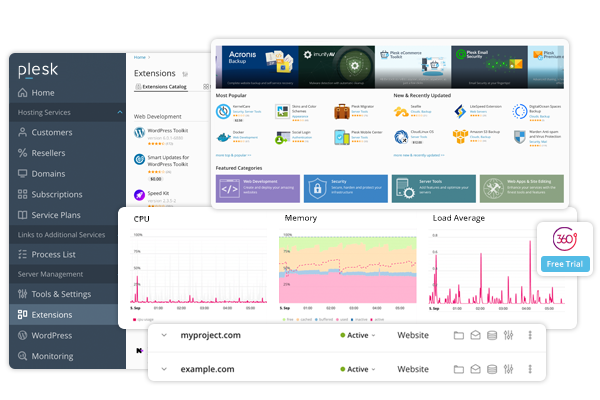
One of the defining characteristics of Plesk is its centralized administrative dashboard. From this interface, users can monitor server resources, manage domains, configure hosting environments, and oversee multiple websites.
The dashboard structure separates administrative roles into different access levels. For example, system administrators can manage server-wide settings, while individual website owners may only see options related to their own domains.
Domain and Website Management
Plesk provides tools for managing domain registrations, subdomains, and hosting configurations. Users can configure hosting settings such as document roots, DNS records, and web server behavior.
This functionality is particularly relevant for hosting providers managing many websites on a single server. Instead of manually creating virtual host configurations, the control panel generates and maintains these settings automatically.
Application Deployment Tools
The platform supports installation and management of common web applications through integrated installers. Content management systems, blogging platforms, and development frameworks can be deployed without manually configuring databases or server environments.
For developers, Plesk also integrates version control systems, staging environments, and deployment automation tools.
Database Administration
Web applications typically rely on databases to store content, user accounts, and configuration information. Plesk allows administrators to create, modify, and manage databases through the interface.
Supported database engines commonly include MySQL, MariaDB, and PostgreSQL. The platform also integrates database management utilities to simplify administrative tasks.
Email Hosting and Management
Another core component is integrated email server administration. Users can create domain-based email accounts, configure forwarding rules, manage spam filtering, and set mailbox quotas.
Email services are often bundled with website hosting packages, making integrated email management an important function within hosting control panels.
Security and SSL Management
Security management tools are included to assist with tasks such as installing SSL certificates, managing firewall rules, and scanning websites for vulnerabilities.
Plesk also integrates automated certificate management through certificate authorities, allowing administrators to implement HTTPS encryption without manual certificate installation processes.
Extension Ecosystem
The platform supports an extension framework that allows additional functionality to be added to the core system. These extensions can provide integration with cloud services, security tools, backup solutions, or development environments.
This modular structure allows hosting providers and administrators to customize the platform according to their operational requirements.
Common Use Cases
Web Hosting Providers
Hosting companies often rely on control panels to manage large numbers of customer accounts and websites. Plesk allows providers to create separate hosting environments for clients while maintaining centralized server control.
This structure supports shared hosting models where multiple websites operate on the same infrastructure but remain logically separated.
Web Developers Managing Multiple Sites
Developers who maintain websites for different clients may use Plesk to organize projects under one interface. Tools such as staging environments, domain management, and application installers simplify deployment workflows.
Instead of configuring each server manually, developers can rely on preconfigured hosting environments.
Organizations Running Internal Servers
Businesses that operate internal web services or company websites may use Plesk to manage infrastructure without requiring full-time system administrators.
The graphical interface allows IT teams to perform common tasks such as domain management, database setup, and certificate installation.
Managed Server Environments
Many cloud providers and managed hosting services offer Plesk as an optional server management layer. This allows customers to interact with servers through an interface rather than command-line administration.
Potential Advantages
Simplified Server Administration
One frequently cited benefit of hosting control panels is reduced complexity in server management. Tasks that would normally require manual configuration—such as setting up DNS records or creating databases—can be performed through interface controls.
This approach reduces the need for detailed knowledge of server configuration files.
Multi-Site Management
Plesk allows administrators to manage multiple domains and websites from a single dashboard. This capability is useful for agencies, hosting providers, and organizations responsible for several web properties.
Compatibility With Multiple Operating Systems
Unlike some hosting control panels that focus only on Linux environments, Plesk supports both Linux and Windows servers. This dual compatibility allows organizations with mixed infrastructure to use a consistent management platform.
Integrated Security Tools
The platform includes built-in tools for managing SSL certificates, monitoring vulnerabilities, and configuring security policies. Centralizing these functions helps administrators maintain consistent security practices across hosted websites.
Modular Expansion
Through its extension system, Plesk can integrate additional tools without requiring major changes to the core software. This flexibility allows administrators to adapt the platform to different operational needs.
Limitations & Considerations
Resource Overhead
Control panels introduce an additional software layer on top of the operating system. As a result, servers running Plesk may require more system resources compared with minimal installations that rely solely on command-line management.
For high-performance environments, administrators sometimes prefer direct server configuration to minimize overhead.
Learning Curve for New Users
Although graphical interfaces simplify many tasks, new users may still need time to understand the structure of hosting control panels. Managing domains, databases, email services, and security settings within a single interface can initially feel complex.
Documentation and training are often required for effective use.
Licensing and Deployment Models
Unlike some open-source server management tools, Plesk typically operates under commercial licensing models. Organizations evaluating hosting control panels often consider licensing structures alongside technical features.
Dependency on Control Panel Architecture
When servers are configured through a control panel, system configurations are often managed automatically by the platform. Directly modifying server files outside the interface can sometimes cause conflicts with automated settings.
Administrators therefore need to follow recommended configuration methods.
Who Should Consider Plesk
Certain types of users may find hosting control panels like Plesk particularly relevant.
Web hosting providers managing many customer websites often rely on structured administration interfaces to streamline account management.
Digital agencies and freelancers responsible for maintaining client websites may benefit from the centralized management environment.
Small and medium-sized organizations operating internal websites or web applications sometimes use control panels to simplify server administration without requiring advanced system expertise.
Developers working in managed hosting environments may also interact with Plesk when servers are preconfigured by infrastructure providers.
Who May Want to Avoid It
While control panels provide convenience, they are not always the preferred solution for every environment.
Advanced system administrators who require precise control over server configurations may prefer direct command-line management.
High-performance or specialized infrastructure environments sometimes avoid control panels to minimize additional software layers.
Minimalist server deployments, such as container-based microservice systems, may rely on automated orchestration tools rather than traditional hosting control panels.
In these cases, the overhead and structural constraints of a control panel may not align with infrastructure design goals.
Comparison With Similar Tools
Several platforms occupy the same category as Plesk, each offering similar capabilities with different design approaches.
cPanel
cPanel is one of the most widely recognized hosting control panels. It is traditionally associated with Linux hosting environments and is commonly used by shared hosting providers.
cPanel typically separates administrative and user functions into two interfaces: WHM (Web Host Manager) for server administration and cPanel for individual website management. In contrast, Plesk integrates many functions into a unified interface.
DirectAdmin
DirectAdmin is another alternative often used in hosting environments. It is known for a relatively lightweight architecture and straightforward interface.
Compared with Plesk, DirectAdmin may offer fewer built-in integrations but can require fewer system resources depending on configuration.
Webmin
Webmin is an open-source server administration interface that allows configuration of many Linux services through a web interface. While powerful, Webmin typically requires more manual setup than commercial hosting control panels.
Final Educational Summary
Server management platforms play a significant role in the web hosting ecosystem by simplifying complex administrative tasks. Instead of configuring web servers, databases, domains, and security settings individually through command-line tools, control panels centralize these functions within graphical interfaces.
Plesk represents one example of this category of software. Designed to operate on both Linux and Windows servers, it provides tools for managing websites, hosting environments, applications, and server services from a unified dashboard. Its capabilities include domain administration, database management, email hosting, security configuration, and extension-based customization.
Like other hosting control panels, the platform is commonly used by hosting providers, web developers, and organizations managing multiple websites. At the same time, it introduces considerations related to resource usage, licensing structures, and architectural dependencies.
Examining platforms such as Plesk helps illustrate how server management tools support website infrastructure. Understanding their capabilities, limitations, and use cases allows administrators and developers to evaluate whether graphical control panels align with their operational requirements.
Disclosure: This article is for educational and informational purposes only. Some links on this website may be affiliate links, but this does not influence our editorial content or evaluations.